

Help desk teams face many of the same challenges regardless of company size or industry. Tickets pile up, users bypass the help desk, technicians spend too much time on repetitive requests, and managers struggle to understand what is happening across the support queue.
The good news is that most common help desk problems have practical solutions.
The most common problems include ticket backlogs, slow response times, poor ticket prioritization, repetitive requests, incomplete ticket information, tickets getting lost or forgotten, weak reporting, low user adoption, and difficulty integrating the help desk with the tools employees already use.
The right combination of processes, automation, self-service, reporting, and help desk software can solve many of these issues.
Quick answer: The most common help desk problems are growing ticket backlogs, slow response and resolution times, poor prioritization, repetitive manual work, incomplete ticket information, missed SLAs, low user adoption, weak reporting, and difficulty integrating support into existing employee workflows. Solutions include automated ticket routing, clear priorities and SLAs, self-service resources, knowledge bases, workflow automation, better reporting, and a help desk that works with the tools employees already use.
Common Help Desk Problems at a Glance
| Help desk problem | Common cause | Solution |
|---|---|---|
| Ticket backlog | High ticket volume and manual processes | Automate routing, prioritization, and repetitive tasks |
| Slow response times | Poor assignment and prioritization | Use automated routing, SLAs, and escalations |
| Tickets get lost or forgotten | Email inboxes and unclear ownership | Centralize tickets and assign clear ownership |
| Repetitive requests | No self-service or knowledge base | Create self-service resources and automate common requests |
| Incomplete ticket information | Poor request forms and intake processes | Use structured forms that collect the information technicians need |
| Users bypass the help desk | Difficult submission process or poor user experience | Make requesting help simple and accessible |
| Missed SLAs | No monitoring or escalation process | Automate SLA tracking and notifications |
| Poor reporting | Data is difficult to organize or interpret | Use dashboards and actionable KPIs |
| Low user adoption | Unfamiliar or inconvenient interfaces | Meet users where they already work |
| Difficult integrations | Help desk operates separately from existing systems | Integrate with Microsoft 365, Teams, email, and other business tools |
| Too much manual work | Repetitive workflows handled by technicians | Automate routing, notifications, approvals, and updates |
| Difficulty supporting multiple departments | Help desk designed only for IT | Use a platform that supports multiple service desks and workflows |
These problems are related. A poorly designed ticket intake process can create incomplete tickets. Incomplete tickets increase resolution time. Longer resolution times contribute to backlogs. Backlogs frustrate users, which can cause them to bypass the help desk entirely.
Addressing the underlying process can therefore solve several problems at once.
1. Growing Ticket Backlogs
One of the most visible help desk problems is a growing backlog of unresolved tickets.
A backlog can develop when ticket volume increases faster than the support team can resolve requests. But staffing is not always the root cause. Manual processes, poor prioritization, inefficient assignment, and repetitive requests can consume a significant amount of technician time.
How to solve a help desk backlog
Start by determining why tickets are accumulating.
Look at:
- Ticket volume by day, week, and month
- Average response and resolution times
- Tickets by category
- Tickets by technician
- Aging tickets
- Reopened tickets
- Repetitive requests
- Tickets that are waiting for users
- Tickets that are waiting for another department
Then automate wherever possible.
For example, a help desk can automatically:
- Assign tickets to the appropriate technician
- Set priorities based on request type
- Notify technicians when tickets are approaching an SLA
- Escalate overdue tickets
- Send status updates to users
- Route specific requests to specialized teams
Reducing the amount of administrative work allows technicians to spend more time actually resolving tickets.
2. Slow Response and Resolution Times
Users expect help desks to respond quickly, particularly when an IT problem prevents them from working.
Slow resolution times can result from several factors:
- Tickets are assigned manually
- Urgent requests are mixed with routine requests
- Technicians lack the information they need
- Tickets are repeatedly reassigned
- Technicians spend too much time on administrative work
- Common issues are solved manually every time
How to solve slow help desk response times
Start by separating response time from resolution time.
A technician may acknowledge a ticket quickly while the actual resolution takes much longer.
Track both metrics and identify where time is being lost.
Automated assignment, prioritization, SLA tracking, escalation rules, knowledge bases, and self-service can all reduce unnecessary delays.
For recurring issues, document the resolution so technicians do not have to start from scratch every time the same problem appears.
3. Poor Ticket Prioritization
Not every ticket has the same impact.
A request to reset a password is important, but a problem preventing an entire department from working may be significantly more urgent.
Without a clear prioritization system, technicians may work tickets in the order they arrive rather than based on business impact.
How to solve poor ticket prioritization
Create clear priority criteria based on factors such as:
- Number of users affected
- Business impact
- Urgency
- Department
- Type of issue
- Security implications
- Operational deadlines
Then build those rules into the help desk.
Automated prioritization can help ensure that high-impact requests receive attention before routine requests.
4. Tickets Get Lost or Forgotten
A shared email inbox can seem like a simple way to manage support requests.
It often becomes chaotic as ticket volume grows.
Messages can be buried under newer emails. Multiple technicians may respond to the same request. Nobody may know who owns a particular issue. Follow-ups can be missed.
How to solve lost help desk tickets
Use a centralized ticketing system that gives every request:
- A unique ticket
- An assigned owner
- A status
- A priority
- A history of communication
- A record of actions taken
- A clear next step
Email can still be part of the process, but it should feed into a structured ticket rather than becoming the ticket-management system itself.
5. Repetitive Help Desk Requests
Help desk teams often spend significant time answering the same questions repeatedly.
Password and access questions, software instructions, common errors, equipment requests, and other routine issues can consume technician time even when the solution is already known.
How to solve repetitive help desk requests
Create a knowledge base containing solutions to frequently reported problems.
You can also use self-service for common requests.
For example, instead of requiring a technician to manually handle every request, users may be able to:
- Find an answer in a knowledge base
- Submit a standardized request
- Check the status of an existing ticket
- Request common equipment
- Follow a troubleshooting guide
- Complete a form that automatically starts a workflow
The goal is not to prevent users from contacting IT. It is to make sure technicians spend their time on problems that actually require their expertise.
6. Incomplete or Poorly Structured Ticket Information
A technician cannot efficiently resolve a problem if the original request simply says:
“My computer isn’t working.”
The technician may need to ask several follow-up questions before troubleshooting can even begin.
That creates unnecessary back-and-forth and increases resolution time.
How to solve incomplete tickets
Use structured request forms that collect the information required for each type of request.
For example, a software access request might ask for:
- Application name
- Employee name
- Department
- Manager
- Required access level
- Business justification
A hardware request could collect different information.
The important point is that the form should change based on the type of request rather than forcing every user through the same generic form.
7. Users Bypass the Help Desk
One of the most frustrating help desk problems is when employees stop using the help desk altogether.
Instead, they:
- Email individual technicians
- Call IT directly
- Send Teams messages
- Walk to the IT department
- Ask coworkers for help
This creates an unofficial support system that is difficult to track.
It also makes reporting inaccurate because the help desk never sees the actual volume of requests.
Why do users bypass the help desk?
Common reasons include:
- The submission process is difficult
- Users don’t know where to submit requests
- The help desk takes too long to respond
- Users don’t want to learn another application
- They are accustomed to contacting someone directly
- They cannot easily check the status of their request
How to increase help desk adoption
Make requesting help as easy as possible.
A help desk should fit naturally into employees’ existing workflows.
For organizations using Microsoft 365, that may mean allowing employees to interact with support through familiar environments such as Microsoft Teams, Outlook, and SharePoint.
The goal is not simply to deploy a help desk. The goal is to make the help desk the easiest way to get help.
8. Missed SLAs and Escalations
Service level agreements give help desk teams measurable expectations for responding to and resolving requests.
The problem occurs when SLA deadlines are tracked manually or only reviewed after a ticket has already become overdue.
How to solve missed SLAs
Automate SLA monitoring.
A help desk should be able to:
- Start SLA timers automatically
- Track response and resolution targets
- Alert technicians before an SLA is breached
- Escalate overdue tickets
- Report SLA performance by team, category, or time period
This turns SLA management from a spreadsheet exercise into an operational process.
9. Poor Help Desk Reporting and Visibility
A help desk generates a significant amount of useful data.
But having data is not the same as having useful reporting.
IT leaders need to answer questions such as:
- How many tickets are we receiving?
- Which categories generate the most requests?
- How quickly are we responding?
- How quickly are we resolving tickets?
- Which SLAs are being missed?
- Which technicians or teams have the largest workloads?
- Are ticket volumes increasing?
- Which problems keep occurring?
- Which departments generate the most requests?
How to improve help desk reporting
Focus on metrics that support decisions rather than simply collecting as many metrics as possible.
Useful help desk KPIs can include:
- Ticket volume
- First response time
- Average resolution time
- SLA compliance
- Backlog
- Ticket age
- Reopened tickets
- Tickets by category
- Tickets by department
- Customer or employee satisfaction
The best reporting system makes these metrics easy to access without requiring a data analyst to manually assemble reports.
10. Low User Satisfaction
A help desk can technically resolve tickets while still providing a poor user experience.
Users may become frustrated when:
- They don’t know what is happening with their ticket
- They have to repeatedly explain the same problem
- They don’t know how long resolution will take
- They cannot easily contact the support team
- They receive little communication during the process
How to improve help desk satisfaction
Communication is a major part of the support experience.
Automated notifications can keep users informed when:
- A ticket is received
- A technician is assigned
- A ticket status changes
- More information is needed
- A resolution is available
- A ticket is closed
You can also collect satisfaction feedback after tickets are resolved.
11. Too Much Manual Work
Many help desk processes involve repetitive administrative tasks.
Technicians may spend time:
- Assigning tickets
- Sending notifications
- Updating statuses
- Requesting approvals
- Following up with users
- Escalating tickets
- Creating reports
- Entering information into multiple systems
Every individual task may seem small. Collectively, they can consume substantial time.
How to solve excessive manual work
Look for processes that happen repeatedly and predictably.
Those are strong candidates for automation.
For example:
Ticket submitted → automatically categorized → assigned to technician → SLA started → technician notified → escalation triggered if overdue → user notified when status changes
Automation allows the help desk to manage more requests without requiring technicians to perform every administrative step manually.
12. Difficulty Integrating the Help Desk With Existing Tools
A help desk shouldn’t exist in isolation.
Employees already work in applications such as Microsoft Teams, Outlook, SharePoint, and other business systems.
If getting help requires employees to leave those applications, adoption can suffer.
This is an area where our own 2023 research provides useful insight.
What Help Desk Users Said They Wanted
In 2023, Crow Canyon conducted a poll on Reddit asking users about the help desk features they wanted.
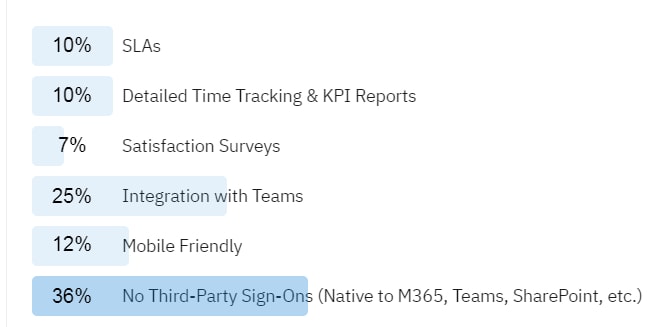
Crow Canyon Software’s 2023 Reddit poll on desired help desk features. In the poll, 36% of respondents selected no third-party sign-ons, while 25% selected Microsoft Teams help desk integration.
The results were:
- 36% wanted no third-party sign-ons, with the help desk native to Microsoft 365, Teams, SharePoint, or similar environments.
- 25% wanted integration with Microsoft Teams.
- 12% wanted a mobile-friendly help desk.
- 10% wanted SLAs.
- 10% wanted detailed time tracking and KPI reports.
- 7% wanted satisfaction surveys.
This was a 2023 Reddit poll, so it should not be interpreted as a current industry-wide survey. However, it provides useful first-party insight into the types of help desk capabilities users were looking for.
The two largest responses were particularly notable: 36% selected eliminating third-party sign-ons, while another 25% selected Microsoft Teams integration.
Together, those responses reinforce an important principle: the help desk experience matters just as much as the underlying ticket-management functionality.
How to improve help desk integration
When evaluating a help desk, ask:
- Does it use our existing identity system?
- Can employees access it through the tools they already use?
- Does Teams integration provide actual functionality or simply open a web application?
- Can information flow between the help desk and other business systems?
- Can workflows be automated across those systems?
Integration should reduce friction, not simply add another application to the technology stack.
13. Low Help Desk Adoption
Technology adoption is ultimately a user experience problem.
A help desk may have excellent functionality, but if employees don’t use it, the organization won’t receive the full benefit.
This is why familiar interfaces can matter.
For organizations already invested in Microsoft 365, a help desk that works with SharePoint, Microsoft Teams, Outlook, and Microsoft identity can reduce the number of new tools employees have to learn.
How to improve adoption
Make the process simple:
- Make it obvious where employees should request help.
- Minimize additional logins.
- Keep request forms short and relevant.
- Provide self-service for common questions.
- Let users see their ticket status.
- Communicate automatically.
- Measure adoption and identify groups that still bypass the system.
A successful help desk is one that employees actually use.
14. Difficulty Expanding the Help Desk Beyond IT
Organizations often start with an IT help desk.
Over time, other departments may want similar capabilities.
HR may need a service desk for employee requests. Facilities may need to manage maintenance requests. Finance may need approval workflows. Operations may need an internal request system.
If the original help desk only supports IT, the organization may end up purchasing and maintaining multiple systems.
How to solve this problem
Consider whether the underlying platform can support multiple service areas.
Ideally, each department should be able to have its own:
- Request types
- Forms
- Workflows
- Permissions
- Queues
- SLAs
- Notifications
- Reports
while still using the same underlying platform.
This can reduce the number of systems IT has to maintain and give employees a consistent experience across departments.
How to Prevent Common Help Desk Problems
Most help desk problems can be traced back to a handful of underlying issues.
1. Centralize support requests
Don’t rely on scattered email messages, spreadsheets, Teams conversations, and phone calls as the primary record of support activity.
2. Automate repetitive processes
Automate assignment, notifications, escalations, approvals, and other predictable tasks.
3. Give users self-service options
A knowledge base and self-service request options can reduce unnecessary tickets.
4. Make ticket intake structured
Collect the information technicians need at the beginning of the process.
5. Track meaningful KPIs
Monitor response time, resolution time, backlog, SLA performance, ticket volume, and other metrics that help managers make decisions.
6. Make the help desk easy to use
If employees have to learn an unfamiliar system or navigate a complicated process to request help, adoption will suffer.
7. Integrate with the tools employees already use
The help desk should fit into existing workflows rather than creating another disconnected system.

How to Evaluate Help Desk Software
If your organization is considering a new help desk, don’t evaluate products based solely on the feature list shown during a demo.
Ask vendors to demonstrate how their software handles real scenarios.
Ticket management
- How are tickets submitted?
- How are tickets assigned?
- Can tickets be automatically prioritized?
- How are duplicate tickets handled?
- Can technicians see the complete history?
Automation
- Can repetitive tasks be automated?
- Can notifications and escalations happen automatically?
- Can approvals be incorporated into workflows?
User experience
- How do employees submit requests?
- Can they check ticket status?
- Does the system require another login?
- Does it work within tools employees already use?
Reporting
- Can managers see ticket volume and backlog?
- Can you track SLAs?
- Can you report on resolution times?
- Can you create reports without specialized technical skills?
Integration
- Does it integrate with Microsoft Teams?
- Does it work with Microsoft 365?
- Does it work with Outlook?
- Can it connect to other business applications?
Scalability
- Can the same platform support HR, facilities, finance, or other departments?
- Can workflows be customized for different teams?
- Does the pricing model make sense as the organization grows?
How NITRO Help Desk Addresses Common Help Desk Problems
NITRO Help Desk is Crow Canyon’s help desk and ticketing platform for organizations that want to manage IT support within the Microsoft ecosystem.
It is built on Microsoft 365, SharePoint, and Teams and can be configured around an organization’s specific ticketing processes.
NITRO Help Desk can help organizations address common problems such as:
- Manual ticket assignment
- Poor ticket visibility
- Missed SLAs
- Repetitive administrative work
- Limited reporting
- Difficult request intake
- Low user adoption
- Disconnected support workflows
- Difficulty extending service management beyond IT
Because it is built around Microsoft technologies, organizations can use familiar Microsoft identity and collaboration tools as part of the help desk experience.
NITRO Help Desk can also support service requests beyond IT, allowing organizations to build workflows for departments such as HR, facilities, purchasing, and other internal services.
Learn more about NITRO Help Desk and see how it can be configured for your organization’s workflows.
Real-World Example: Improving Help Desk Adoption at Washington, DC Department of Transportation
The Washington, DC Department of Transportation (DDOT) provides a useful example of what happens when a help desk doesn’t fit the way employees actually work.
DDOT had an automated ticketing system, but only about 5% of employees were using it. Employees instead walked into the IT office, called IT, or otherwise contacted the team directly.
That meant IT staff had to spend time entering requests manually, contributing to the support backlog.
The solution was to build the help desk experience around SharePoint, an environment DDOT employees were already familiar with.
The result was dramatically higher adoption and less manual ticket entry for IT.
Read the full DDOT case study →
The lesson is important: a help desk doesn’t succeed simply because the software works. Employees have to be willing and able to use it.
Frequently Asked Questions
What are the most common help desk problems?
Common help desk problems include ticket backlogs, slow response times, poor ticket prioritization, lost or forgotten tickets, repetitive requests, incomplete ticket information, missed SLAs, poor reporting, low user adoption, and excessive manual work.
What causes a help desk backlog?
Help desk backlogs can result from high ticket volume, insufficient staffing, poor prioritization, inefficient ticket routing, repetitive manual processes, and a lack of self-service or automation.
How can a help desk reduce ticket response times?
Automated ticket routing, clear priority rules, SLA tracking, escalation notifications, knowledge bases, self-service, and workflow automation can all help reduce response and resolution times.
Why do employees bypass the help desk?
Employees may bypass a help desk because the submission process is inconvenient, they don’t know where to submit requests, the system requires another login, or they believe contacting a technician directly will be faster.
How can help desk teams reduce repetitive tickets?
A knowledge base and self-service resources can help users solve common problems themselves. Automation can also handle repetitive requests and administrative tasks without requiring technician involvement.
What help desk metrics should IT teams track?
Common help desk KPIs include ticket volume, backlog, first response time, average resolution time, SLA compliance, ticket age, reopened tickets, ticket categories, and user satisfaction.
What features should help desk software have?
Important help desk capabilities include help desk ticket management, automated routing, prioritization, SLAs, reporting, workflow automation, notifications, knowledge management, self-service, integrations, and a user-friendly request experience.
Does Microsoft Teams integration make a help desk easier to use?
It can. The value depends on the depth of the integration. A Teams tab that simply opens a vendor’s web application provides a different experience from a help desk that allows users or technicians to perform meaningful ticket actions directly within Teams.
Can one help desk support departments beyond IT?
Yes. A platform with configurable forms, workflows, permissions, queues, SLAs, and reporting can support departments such as HR, facilities, finance, purchasing, and operations in addition to IT.
The Bottom Line
Help desk problems rarely come from a single issue.
A growing backlog may be caused by poor prioritization. Slow resolution times may be caused by incomplete ticket information. Repetitive requests may be caused by a lack of self-service. Low adoption may be caused by an inconvenient user experience.
The most effective approach is to identify the underlying cause and address it with a combination of better processes, automation, self-service, reporting, and the right help desk technology.
For organizations using Microsoft 365, it is also worth considering how well the help desk fits into the tools employees already use.
A help desk should make it easier to request, manage, track, and resolve support issues, not create another disconnected system for employees and IT teams to manage.
Request a demo of NITRO Help Desk!
Privacy Notice:
By submitting this form, you consent to Crow Canyon Software collecting and processing your personal information to respond to your inquiry. Do not include sensitive health or personal data unless specifically requested.
Your information will be handled in accordance with our Privacy Policy and applicable data protection laws, including HIPAA and GDPR where applicable.



