Microsoft 365 solutions for housing authorities

Built for housing authorities.

Housing authority software for help desk, inspections and asset tracking, running on Teams and SharePoint. One system for your main office, your properties and your field staff.


A Teams chat becomes a ticket in two clicks
Flat annual fee with unlimited users
Inspections with photos and deadlines
Your data stays in your own Microsoft 365
Runs inside your own environment
NITRO Help DeskOpen tickets
Heater not working, site office
Facilities · Assigned

High

Unit 4B inspection: Needs Repairs
Inspections · Photos attached

Normal

New hire laptop and access
IT · Awaiting approval

Normal

Password reset
IT · Answered by Copilot

Resolved

Microsoft TeamsSharePointMobile appText & email intake
Join the housing authorities already benefitting from NITRO
Vancouver Housing Authority
DC Housing Finance Agency
Housing Authority of Baltimore City
Sacramento Housing and Redevelopment Agency
Oklahoma City Housing Authority
Akron Metropolitan Housing Authority
Trusted by 1,000+ Organizations, Defense Contractors & Federal Agencies Worldwide
Why Crow Canyon

Proven with housing authorities. Tailored to your team.

Start with a help desk that is already working at housing authorities, then shape the rest around how your teams actually work.

Trusted Partner

Discover what housing authorities are already doing with NITRO

Ticketing, inspections and property records built for the way housing teams work, on tools their staff already use.

See custom solutions

A custom solution for any workflow

Your process is not off the shelf. We tailor NITRO to your department with NITRO Studio, with no-code and low-code, on the platform you already run.

Help Desk for ITAsset ManagementWork OrdersPurchase RequestsContract ManagementService DeskNITRO Studio
Housing authorities

Why housing authorities choose Crow Canyon

Everything your team needs to handle requests, without adding another system.

Request a Demo →

Two clicks

Works where your staff already work

A Teams chat becomes a ticket in two clicks, inside the tools your staff open every day. Little to learn, quick to roll out.

Flat annual fee

Your data, your budget

Tickets stay in your own tenant, under your own permissions. One flat annual fee, unlimited users, with nothing to install.

Every site

Reaches staff at every site

Requests arrive by email, Teams, portal, mobile app, or text. Technicians assign and resolve from anywhere, including the field.

EmailTeamsPortalMobile appText

Auto-routing

Keeps up with a busy team

Tickets route to the right team automatically. Reminders and escalations keep work moving before deadlines slip.

Board-ready

Clear numbers for your board

Dashboards show what is open, overdue, and unassigned. Reports cover workload, response times, and trends.

OpenOverdueUnassigned

Add as you go

Grows with you

Add asset tracking, work orders, purchasing, and contract management on the same platform when you are ready.

AssetsWork ordersPurchasingContracts
Customer stories

See what housing authorities built with NITRO Studio

Two real solutions built on Microsoft SharePoint with no-code and low-code.
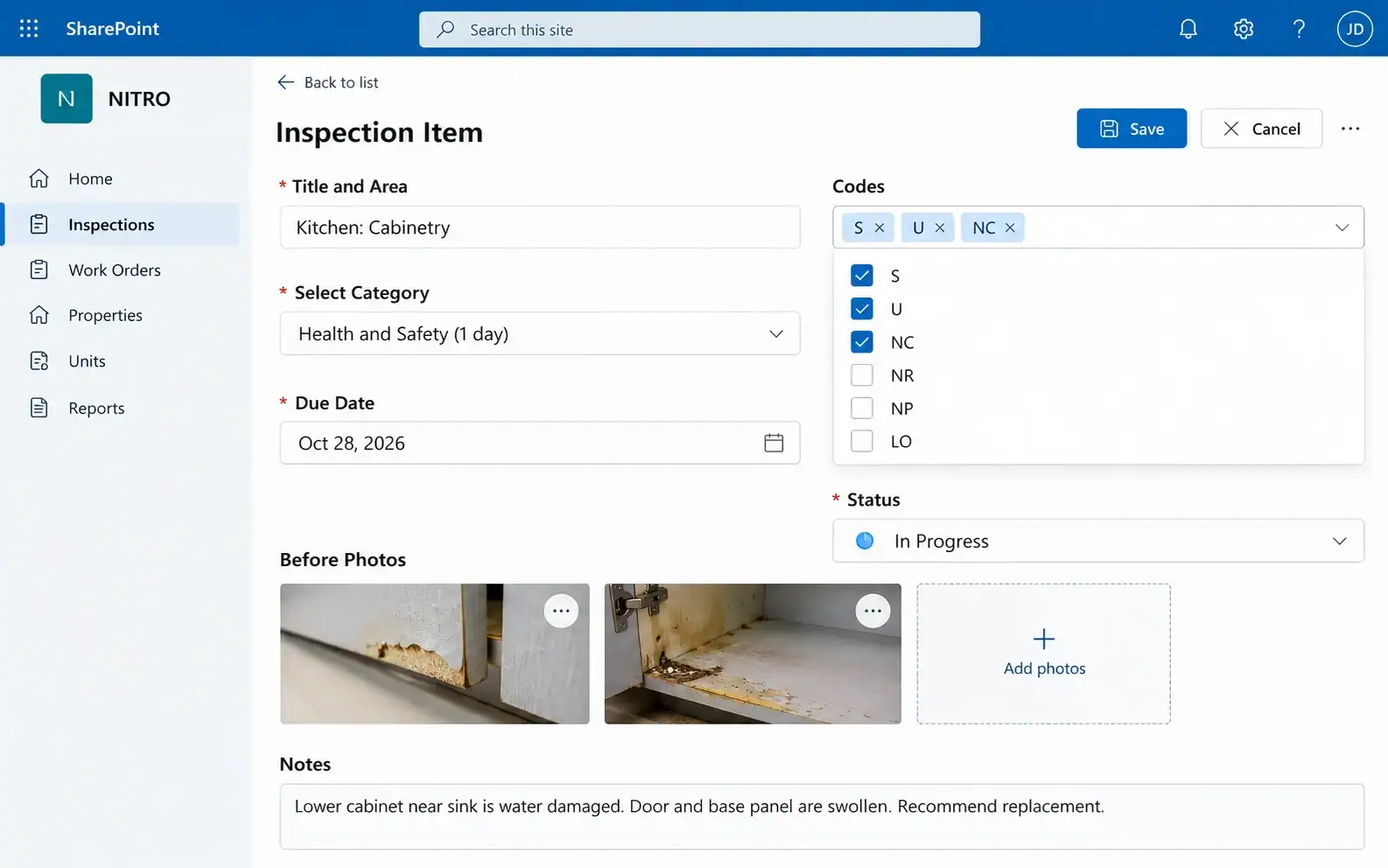
NITRO inspection item form in SharePoint: category Health and Safety (1 day), due date, defect codes, status, before photos and notes
Deadline set by categoryBefore and after photosStandard defect codes
Inspections & repairs

Turning housing inspections into action and accountability

Crow Canyon helped a housing authority strengthen oversight of property conditions and repair follow-through, connecting inspections, maintenance information and reporting.

Less administrative effort. Findings, photographs and reports in one place.
More consistent inspections. One standard approach across properties, shared areas and units.
Stronger accountability. Issues stay visible until resolved, with before and after photos.
Clearer priorities. Health and safety items are due in 1 day, others in 30, with daily reminders.
Better management decisions. Open and overdue deficiencies roll up by property across the portfolio.
SatisfactoryNeeds RepairsNeeds PaintingLight OutDamaged Furnitureand more defect codes

Request a demo of this solution →

One property record

Helping housing authorities take control of property portfolios

Housing operations, relocation, planning and other departments now contribute to one shared property record for the scattered-site portfolio, so staff can find units, update details and open documents in one place.

Less administrative effort. Property details fill in automatically, cutting repeat data entry.
More consistent records. Unique Unit ID checks prevent duplicates.
Clearer visibility into vacancies. Dynamic vacancy calculations show which units need attention.
Better management insight. Excel exports of property, occupancy and disposition data for planning.

Request a demo of this solution →

Scattered-site portfolioVacancy tracker
Unit ID 1042Occupied

Unit ID 1043Vacant

Unit ID 1044Vacant

Unit ID checkOperations · Relocation · PlanningExport to Excel

Optional AI

Add AI to stretch a small team further

The AI runs on your own Azure OpenAI service, so your data stays in your environment.

Available on the Advanced tier for SharePoint Online (commercial, GCC and GCC High). Not available for on-premises or air-gapped deployments.

Self-serve answers

Copilot answers from your knowledge base before a ticket is filed.

Draft replies

Technicians review and send AI-drafted replies.

Categorize and prioritize

New tickets get a category and priority automatically.

Summarize threads

Long ticket threads boiled down to the essentials.

Auto Email Response

The AI drafts and sends a reply using past tickets and your knowledge base.

Credentials & compliance

Approved, audited and flexible to deploy

SOC 2 Type 2
Audited controls
ISO 27001:2022
Certified ISMS
CMMC 2.0 Level 1
Self-assessed
HIPAA & GDPR
Privacy aligned

Approved vendor

California Certified Small BusinessCalifornia SLP Approved VendorCMAS ContractNYC PASSPort Approved Vendor

Deploy the way your IT requires

SharePoint Online (commercial)GCCGCC HighSharePoint On-Premises (connected or air-gapped)

Customer proof · D.C. Department of Transportation

Adoption jumped from 5% to 90% among 1,100 employees

When a help desk is easy to use, people use it. DDOT's staff went from rarely logging tickets to making NITRO Help Desk the way requests get in.

"It's so easy for employees to input a ticket…" — Ukamaka Udeh, SharePoint Administrator, DDOT

Request a Demo →

Help desk adoption
Before NITRO5%
After NITRO90%
1,100 employees

Ready to see how it would work for your team?
We will walk you through it and reply within minutes.

Request a Demo →

Grow into more

Start with the help desk. Add what you need later.

Every module runs on the same platform, so adding tools never means adding a new system.

NITRO Asset Management

Track your equipment and sync device data from Intune.

Explore asset tracking →

NITRO Work Order Management

Create, assign and follow maintenance work orders to completion.

See work order tracking →

NITRO Purchase Requests

Purchase approvals, vendor catalogs and POs in one workflow.

View purchase orders →

NITRO Contract Management

Keep contracts organized in the same system as your requests.

Review contract management →

NITRO Service Desk

Service requests across departments, with catalogs and routing rules.

See the service desk →

NITRO Studio

The no-code and low-code builder behind every NITRO app. Build the exact form or workflow your authority needs.

Explore NITRO Studio →

See how Crow Canyon fits your housing authority

Get a personalized walkthrough of help desk, inspections and property records, tailored to how your teams work today.

Live walkthrough of the housing solutions
Flat annual fee, unlimited users
Reply in minutes

Request a Demo

Your information is protected and stays strictly confidential.

Frequently Asked Questions
Is this a resident portal?
No. NITRO Help Desk is an internal ticketing system for your staff.
Does it replace our housing management system?
No. It runs alongside your housing management system.
Where does our data live?
In your own Microsoft 365 or SharePoint environment.
Can it run on-premises or in a government cloud?
Yes. Both are supported, along with commercial Microsoft 365.
How is it priced?
A flat annual fee with unlimited users.
Can inspectors use tablets in the field?
Yes, through the browser, with camera capture for photos.
Can we report on overdue defects?
Yes. Reports roll up across all of your properties.