Housing authority software must perform three jobs: it must maintain your program records, support the daily work of your staff, and provide documentation when HUD, an auditor or your board asks a question. A small PHA does not need to purchase one product for all three jobs. It can match each responsibility to an appropriate tool, select a pricing model that does not climb with every additional user, and choose applications that its employees will actually open every day.
The small PHA problem: a small team with a real compliance load
HUD defines a qualified PHA, for planning purposes, as an agency whose public housing units and Section 8 vouchers together total 550 or fewer. The agency must not be designated as troubled, and it must not have a failing SEMAP score. This guide uses the term small PHA for authorities in that size range.
Size does not remove responsibilities, because a small authority still transmits family data to HUD through PIC, still inspects its units and still purchases goods and services under public procurement rules. It also answers to a board. It performs all of this with a handful of employees, and many small authorities have no dedicated IT department.
That combination of obligations and limited staff shapes every software decision. You need tools that your team can administer without a developer, that cost the same this year and next year, and that preserve a clear record of who did what.
Per-seat licensing versus flat annual pricing
Per-seat pricing charges a fee for each person who uses the tool, so the total rises every time you add an employee or a location. Flat annual pricing charges a single fee for the plan, regardless of the number of users. For a small authority that expects to expand its team or its portfolio, that difference compounds every year.
Crow Canyon publishes its NITRO Help Desk pricing on its website. The Standard plan costs $3,588 a year with unlimited users, and it includes core ticketing, SLAs, reporting, and problem and change management. The pricing page states that the annual cost remains the same whether you have 10 users or 500.
The table below demonstrates the arithmetic by comparing that published price with an illustrative per-seat tool priced at $50 per user per month. The $50 rate is an assumption for this example and not any vendor’s price list, so replace it with the figure from the quotation you hold.
| Users | Per-seat tool at $50 per user per month (illustrative) | NITRO Help Desk Standard (published price) | Per-seat compared with flat |
|---|---|---|---|
| 5 | $3,000 | $3,588 | $588 lower |
| 10 | $6,000 | $3,588 | $2,412 higher |
| 20 | $12,000 | $3,588 | $8,412 higher |
| 30 | $18,000 | $3,588 | $14,412 higher |
| 40 | $24,000 | $3,588 | $20,412 higher |
At five users, the per-seat tool in this example costs less, and we show that fact so the comparison remains honest. At six users the two options meet, at $3,600 against $3,588, and beyond that point the gap widens with every person you add. If your team grows from 10 users to 30, the per-seat total triples from $6,000 to $18,000, while the flat plan stays at $3,588.
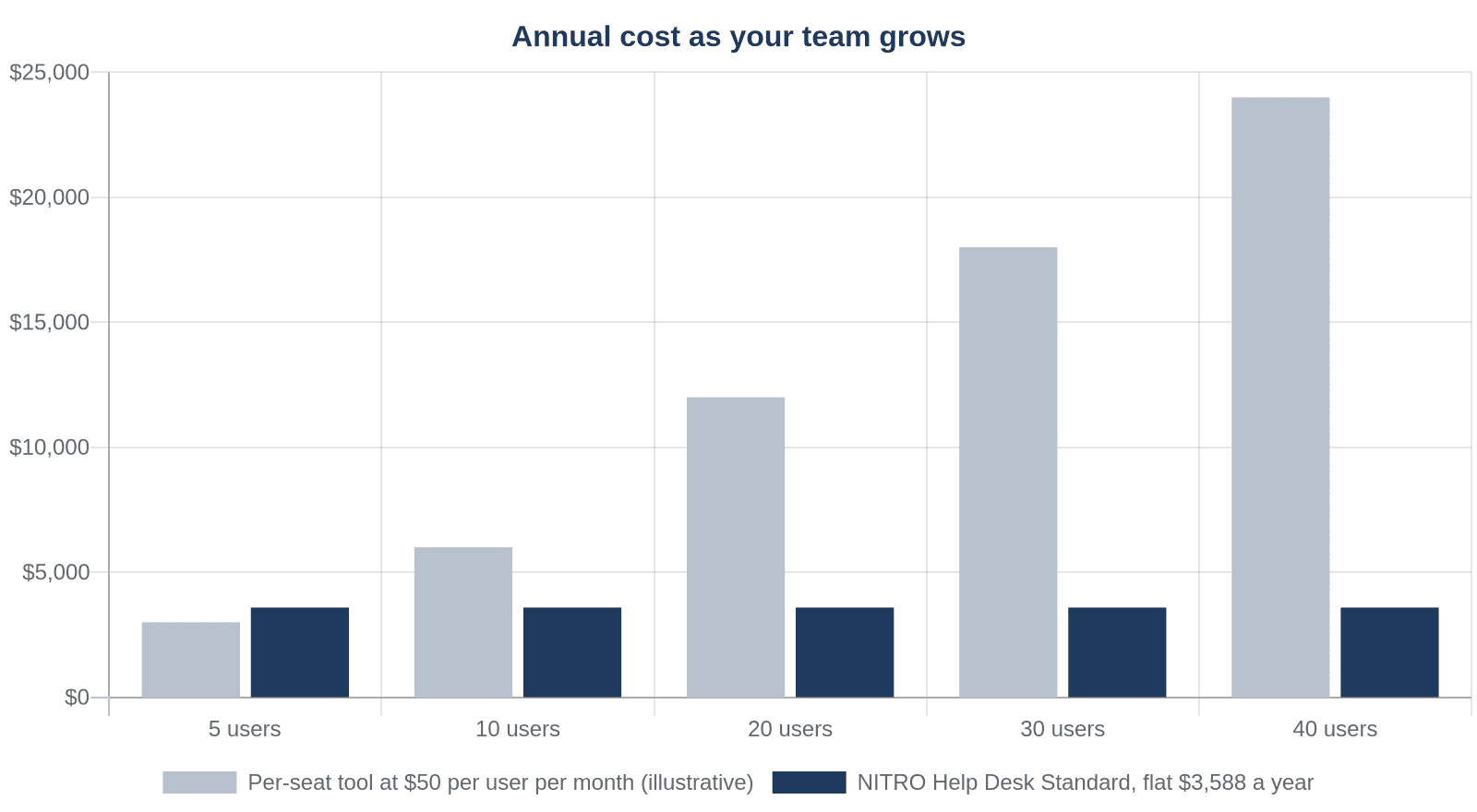
Annual cost of an illustrative per-seat tool compared with flat annual pricing, from 5 to 40 users.
Three cautions apply to this comparison. Some per-seat vendors charge only for agents and not for people who submit requests, so ask exactly who counts as a user. The Standard plan covers help desk ticketing, and it is not a PHA system of record.
Add-on applications, such as Asset Management, Purchase Request System and Contract Management, cost $2,400 a year each with unlimited users, so Standard plus one add-on comes to $5,988 a year.
What to look for: support, compliance and integration
Support that fits the needs of a small team
Small teams depend on vendor support, so ask what is included, who responds and during which hours. Crow Canyon’s site lists a Support Center, a Knowledge Base, a Community Forum and Help Desk Implementation Packages. Ask which of these apply to your plan, and obtain the answer in writing before you sign.
Compliance support, not a compliance promise
Look for an audit trail on every request, approval history that remains with the record, access by role, and reports that your own staff can build. Software supports your compliance process by preserving evidence, but it does not make an authority compliant. People and policy accomplish that, and a vendor that promises otherwise deserves a second look.
Our guide to PHA compliance software covers the four features to test in a demo.
Integration with the systems you already run
Your PHA system of record should remain where it is, and a new tool should not require you to move your accounting or your HUD submissions. It should work with the applications your employees already use, such as Microsoft 365, Teams, SharePoint and Outlook.
Ask whether it uses your existing sign-in and permissions, and ask whether it can run on SharePoint on-premises if you maintain servers in-house. Crow Canyon’s housing authority software page lists the deployment options it supports: SharePoint Online, GCC, GCC High and SharePoint on-premises, including air-gapped installations.
What to avoid: lock-in, hidden scaling costs and tools staff will not use
- Lock-in: Ask where your data resides and whether you can export it. Crow Canyon states that NITRO Studio data is stored within your own Microsoft 365 tenancy or SharePoint farm, which keeps the records under your control.
- Hidden scaling costs: Watch for fees per user, per form, per workflow or per site. Crow Canyon states that the price of NITRO Studio does not increase as you create more forms and workflows, so confirm that point in your own quotation.
- Tools your staff will not use: A separate login and a separate screen for every task invite workarounds. Tools that operate where employees already spend their day, such as Teams and Outlook, get opened more often, so test any tool with two or three non-technical colleagues before you purchase it.
- Tools that duplicate your system of record: If a product claims to replace your accounting and HUD reporting, ask for a written list of the functions it does not perform. Our guide to affordable housing software explains which type of tool handles each job.
Implementation timeline expectations for a small authority
Ask any vendor for dates in writing. Crow Canyon does not publish one fixed go-live time, because timelines depend on several factors. These include how many request types you start with, how many sites and approval paths you have, how much data you must load and how much training your staff need. The company does offer Help Desk Implementation Packages, which it describes as a way to get up and running quickly, so ask for the scope and the dates for your authority.
A phased start suits a small organization, because each step is small enough to complete.
- Select one workflow, such as IT requests or purchase approvals, instead of trying to cover every process at once.
- Configure the request form, the approval routing and the reports with a few staff members who understand the daily work.
- Test the workflow with real requests from real employees, and correct whatever your staff find confusing before you expand.
- Train everyone who will submit or approve requests, using short sessions that focus on the tasks each person performs.
- Begin live operation, review the results after the first month, and then add the next workflow.
Next steps for your authority as you shortlist vendors
Start by writing down your three responsibilities and the tool that owns each one today. Then ask each vendor the same questions about data location, pricing at twice your current size, and the functions the product does not perform. Crow Canyon will walk through your own examples in a live session, so bring one or two real requests, such as a repair request or a purchase approval, when you book a demo.