Where Microsoft 365 helps housing authorities
Microsoft 365 helps housing authorities in three main areas: staff help desk requests, approvals and asset tracking. It does not replace a PHA system of record, which handles rent, subsidy and HUD submissions. Used with care, Teams, SharePoint and Lists give a small team a way to run its daily work in tools that employees already know.
What Microsoft 365 gives you for each job
Housing authority staff who use Outlook, Teams and SharePoint every day already have the front door for three kinds of work. The table shows what Microsoft provides for each one, and where a purpose-built application adds more.
| Need | Microsoft 365 building block | What Microsoft says it does | Where a purpose-built application adds value |
|---|---|---|---|
| Help desk requests | Lists, Issue tracker template | Helps you track, manage and bring issues to a close by making it easy to set priorities in the status column | Ticket routing, SLA tracking, reporting, and problem and change management, as in NITRO Help Desk Standard |
| Approvals | Approvals app in Teams | A native Teams app to create, manage and share approvals, with a notification to each approver | Multi-step forms, business rules and one audit history across many processes, built with a no-code/low-code tool such as NITRO Studio |
| Asset tracking | Lists, Asset manager template | Helps you keep track of physical assets that your team is using, so you know who has which asset | Asset records that link to help desk tickets, as in Crow Canyon’s NITRO Asset Management |
| Record retention | Microsoft Purview retention policies and labels | Retain content, delete content, or retain and then delete it, at the site, mailbox or item level | You configure this in Microsoft 365, and an application does not replace it |
Help desk and IT support in Teams and SharePoint
Housing authority IT support can fall to one or two people who also have other duties, and that is a lot to ask of a small team. A shared mailbox or a Teams channel is a common place to start, and it works until the volume grows. Then requests get lost, nobody can see who owns what, and reports take manual effort.
The Issue tracker template in Microsoft Lists is a sensible first step, because it gives you a priority and a status for every issue. A help desk application built on Microsoft 365 goes further.
Crow Canyon’s pricing page lists core ticketing, SLAs, reporting, and problem and change management in the NITRO Help Desk Standard plan. Our housing authority software buyer’s guide compares the plan’s flat annual pricing with per-seat licensing.
The plan also includes a NITRO Teams app that works with Microsoft 365. Crow Canyon describes NITRO Help Desk as built natively on Microsoft 365, Teams and SharePoint, so staff can raise and track requests where they already work.
Teams as the front door for staff requests
When a request starts in a Teams chat or channel, it is easy for the answer to disappear in the conversation history. A request that starts as a ticket has an owner, a status and a time stamp. That record is what you need when a board member asks how quickly your team responds, or when an auditor asks who handled a specific item. On Crow Canyon’s housing authority software page, NITRO turns a Teams chat into a ticket in two clicks.
Approvals and housing authority workflow automation
The Approvals app in Teams lets staff start a request from a chat, a channel or the app itself. The requester selects an approval type, adds details, attaches files and chooses approvers, and each approver receives a notification. Microsoft states that these approvals trigger directly through the Power Automate infrastructure. You can add custom actions before or after an approval by building a flow.
Common approvals at a housing authority include purchase requests, policy exceptions and the choice of a vendor. Simple one-step approvals fit the Teams app well. Multi-step processes with business rules, such as routing a purchase to a second approver above a set amount, need more design. That design can be done in Power Automate, or with a no-code/low-code workflow tool.
NITRO Studio is Crow Canyon’s tool for building applications in Microsoft 365, Teams and SharePoint. Crow Canyon states that its price does not increase as you create more forms and workflows, and that it runs entirely within your Microsoft 365 tenancy. It also supports SharePoint on-premises, including SharePoint Server Subscription Edition, 2019 and 2016, for agencies that run their own servers.
Asset tracking for equipment and licenses
Housing authorities own laptops, network hardware and software licenses, and someone must know who has each item. The Asset manager template in Microsoft Lists is designed for that purpose, and it works well for a small inventory.
A purpose-built tool adds the link between an asset and the tickets raised about it. Crow Canyon’s housing authority page describes NITRO Asset Management, which tracks equipment, syncs device data from Microsoft Intune and runs on the same platform as the help desk. With that link, a technician can see the history of a device before starting work.
How one request can move through Microsoft 365
Here is an illustrative example, and not a customer story.
A staff member’s laptop stops working, and she posts a request in Teams. In a well-built setup, that request becomes a ticket with an owner and a status. The technician opens the asset record, sees how old the laptop is and what repairs it has had, and decides to replace it. The purchase goes to the director as an approval in Teams. When the new laptop arrives, the asset record is updated and the ticket is closed.
Every step leaves a time stamp, so you can show what happened and who agreed to it. For how records like these support audits, see our guide to affordable housing compliance software.
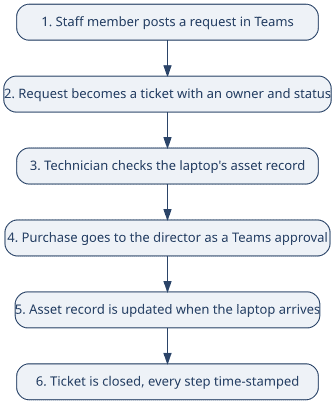
One staff request moving through Teams, the help desk, the asset record and an approval.
Microsoft 365 government housing: GCC and data location
Many housing authorities are public bodies created under state law. Microsoft states that Microsoft 365 Government is open to eligible government customers, including state and local agencies and similar public bodies, after it validates their eligibility. Ask your Microsoft partner whether your authority qualifies.
In the Microsoft 365 GCC environment, Microsoft states that customer content is stored at rest in datacenters located only in the United States. It adds that the content is logically separated from Microsoft’s commercial services, and that access is limited to screened Microsoft personnel. Crow Canyon’s pricing page states that NITRO Help Desk is compatible with GCC and GCC High, and that it runs inside the customer’s own Microsoft government tenant.
What does not work well
- A shared list is not a PHA system of record: Microsoft 365 cannot calculate rent or subsidy, and it cannot file Form HUD-50058 with HUD.
- Lists and Teams alone are not a full help desk: You can build routing and SLA timers with Power Automate. Your team must design, test and maintain them.
- Permissions can drift: A list shared too widely exposes records to people who should not see them, so plan access by role from the start.
- Retention does not configure itself: Microsoft Purview retention policies and labels can retain content, delete it, or retain it and then delete it. Teams messages use policies rather than labels. Ask your counsel which public records rules apply to you.
- One builder can become a single point of failure: If one employee builds every flow and then leaves, nobody else knows how the system works.
What to plan for before you build
- Confirm your licensing and your GCC eligibility with your Microsoft partner before you choose a tenant.
- Name an owner for the tenant and a backup, so that more than one person understands how it is configured.
- Design permissions by role, and review them every quarter.
- Set retention policies before records pile up, and confirm the rules with your counsel.
- Pilot one workflow, such as IT requests or purchase approvals, before you add others.
- Train staff in short sessions, and decide what a good result looks like before you launch.
Crow Canyon will walk through these steps using your own cases, so Request a Demo or review the NITRO Help Desk pricing first. To see how housing authorities already use NITRO for help desk, inspections and asset tracking, visit Crow Canyon’s Housing Authority solutions page.
About Crow Canyon Software: Crow Canyon builds business applications for Microsoft 365, Teams and SharePoint, including NITRO Help Desk, NITRO Service Desk and NITRO Studio, a no-code/low-code platform. The company says it has built on Microsoft platforms for about 20 years.
Disclosure: Crow Canyon sells NITRO, so this guide reflects how we think about the topic. It is general information and not legal advice, so speak with your counsel about public records rules and your own obligations.