What affordable housing software means
Affordable housing software is a set of tools that help housing authorities, nonprofits and property owners operate subsidized and income-restricted housing. It falls into three categories: property management software for rent, leases and accounting; compliance software for program rules and reporting; and internal operations software for help desk, approvals and asset tracking.
The main categories: property management, compliance and internal operations
The phrase affordable housing software covers a wide range of products, and vendors use it loosely, so a clearer method is to sort the products by the job each one does. Three groups help you sort the choices that you meet during a search. Think of it this way: one group keeps the books and the files, one group watches the rules, and one group helps your staff get daily work done. Each group has its own users, its own data and its own price, so it helps to know which group you are shopping in.
| Category | What it covers | Example tasks | Where Crow Canyon fits |
|---|---|---|---|
| Property management | Tenants, leases, rent, subsidy and accounting | Rent calculation, subsidy payments, general ledger, HUD data submissions | Not Crow Canyon’s category |
| Compliance | Program rules tied to each funding source | Annual certifications, inspections, noncompliance reports, tax credit and HUD records | Adds audit trails and approval history around the work, but does not calculate eligibility or file HUD data |
| Internal operations | The daily work of running the organization | Help desk tickets, service requests, purchase approvals, asset tracking, onboarding, contracts | Yes. NITRO Help Desk, NITRO Service Desk and add-on applications built on Microsoft 365, in the cloud or on-premises |
What each category covers, with examples
Property management software
These tools run the housing program itself. They store tenant and lease records, work out rent, track subsidy payments, keep the general ledger and produce the reports that funders require. Vendors such as Yardi and MRI Software offer platforms of this kind for housing agencies. Yardi describes Voyager PHA as integrating compliance, accounting and property management, and MRI says its affordable housing software covers rent calculations, inspection tracking and TRACS submissions. You will also see this group called affordable housing management software or affordable housing property management software.
Compliance software
Compliance tools track the rules that come with your funding. Public housing and voucher agencies send Form HUD-50058 family data to HUD through the Public and Indian Housing Information Center, known as PIC. Agencies that run Section 8 programs also submit and verify SEMAP certifications each year. Owners of tax credit properties must keep records, certify to the credit agency at least once a year and allow inspections under 26 CFR 1.42-5. Many platforms in the first group include a compliance module, and some products do compliance alone.
Whichever you choose, remember that software supports compliance but cannot create it on its own. People and policy do that part. For a closer look at this group, see our guide to affordable housing compliance software.
Internal operations software
Internal operations tools manage the daily work of running a housing agency, both as an employer and as a public body. These include IT help desk tickets, staff requests, purchase approvals, asset tracking, new hire setup and contract tracking. This is the group where Crow Canyon works, and it is the only one that we cover in depth.
NITRO Help Desk and NITRO Service Desk handle tickets and service requests, and add-on applications cover asset management, project management, purchase requests, contracts and licenses, and onboarding.
NITRO Studio is a no-code/low-code platform for building custom forms and workflows, and all of these products run inside Microsoft 365, Teams and SharePoint, either in the cloud or on SharePoint on-premises. Crow Canyon does not offer property management or HUD submissions, and it does not claim to.
How the three categories work together
Here is an illustrative example, and not a customer story. A housing authority finds a leaking roof at one of its sites during an inspection. The property management system holds the unit record, issues the work order and pays the contractor’s invoice, while the compliance records show the inspection finding that triggered the repair and the date it was fixed.
The daily work tool holds the purchase request for the contractor, the approvals that were given and the comments from each approver. Each tool keeps what it was built to keep, and none of them has to do the work of the others. That split keeps every record in one clear place. You do not need to buy all three groups at once. Start with the gap that hurts your team today, and add the next tool when you are ready. When an auditor asks why that contractor was chosen, you open one record in the right tool instead of searching three inboxes.
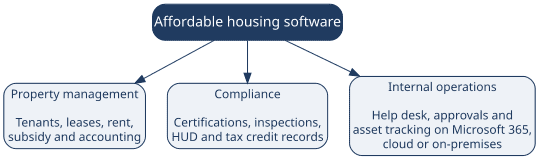
The three categories of affordable housing software and the jobs each one handles.
Key terms in plain English
- PHA: A public housing agency, also called a housing authority, which runs public housing or voucher programs in its local area.
- System of record: The main program that holds your official data, such as tenant, lease, rent and accounting records.
- PIC: HUD’s Public and Indian Housing Information Center, where agencies send their program data.
- Form HUD-50058: The form that agencies use to send HUD data about families in public housing and Section 8 programs.
- SEMAP: The Section 8 Management Assessment Program, which agencies that run Section 8 programs certify each year.
- LIHTC: The low-income housing tax credit, a federal tax credit program for building and keeping rent-restricted homes.
- NSPIRE: HUD’s National Standards for the Physical Inspection of Real Estate, which guide unit inspections.
- Tenant: Your organization’s own space in Microsoft 365, which holds your users, files and settings.
Which type a housing authority typically needs first
A housing authority often starts with a system of record, because rent, subsidy, accounting and HUD data all depend on it. Everything else builds on that base. If you already have one, the next gap is often the daily work around it, where requests and approvals live in email threads and spreadsheets. Three cases show how the choice tends to work.
- No system of record yet: Start with PHA software, because every other tool depends on accurate program data.
- System of record in place, but evidence scattered: Add a tool for daily work that keeps an audit trail of requests and approvals.
- Tax credit properties in your portfolio: Confirm that your tools produce the records that 26 CFR 1.42-5 and your state credit agency expect.
Where Microsoft 365 based tools fit
If your staff already work in Microsoft 365, tools built inside it let employees send and approve requests in the places where they already work. Microsoft’s own building blocks include list templates such as Issue tracker and Asset manager, along with the Approvals app in Teams.
A purpose-built application adds ticket routing, SLA tracking, reporting, and problem and change management to those building blocks. Our guide to Microsoft 365 for housing authorities shows where each building block helps and where it falls short.
In plain terms, your staff do not have to learn a new place to work. These tools sit above your system of record and do not replace it. Authorities that qualify for Microsoft 365 GCC can also run in a government cloud, where Microsoft states that customer content is stored at rest only in datacenters in the United States. Crow Canyon states that NITRO Studio runs entirely within your Microsoft 365 tenancy, so your data stays in your own tenant. Authorities that keep their own servers can run NITRO on SharePoint on-premises instead, including SharePoint Server Subscription Edition, 2019 and 2016.
Common mistakes when choosing housing software
- Expecting one tool to do every job: A system of record is built for rent and subsidy, and it may not suit the daily work of your own staff.
- Skipping the question of who owns each record: When two tools hold the same data, staff will not know which copy is right.
- Ignoring how staff will use the tool: A tool that needs a separate login is less likely to be used than one that lives in Teams or Outlook.
- Comparing prices without checking how they scale: A low price for five users can turn into a high one at thirty.
How to choose between the categories
- List the jobs your staff perform every week, and note where the evidence for each job lives today.
- Match each job to a group, using the table in this guide.
- Check what you already own, because your Microsoft 365 licenses may include tools that you can use right away.
- Ask every vendor what its product does not do, and get the answer in writing.
- Compare pricing models, because per-seat and flat annual pricing behave very differently as your team grows.
- Start with one workflow, and add others after you confirm that your staff use it.
Crow Canyon will walk through the internal operations category using your own cases, so request a demo or review the NITRO Help Desk pricing first.