
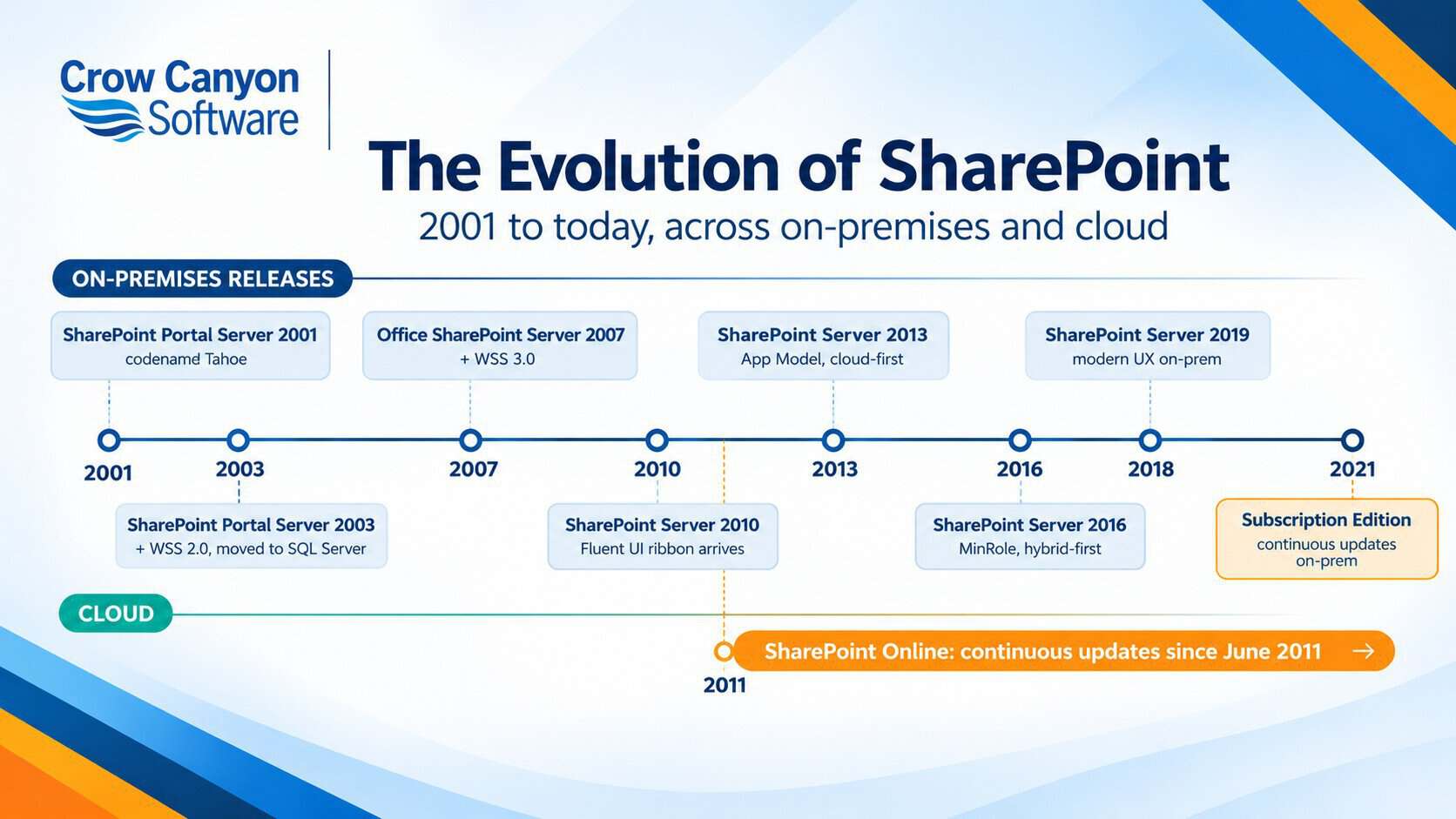
- SharePoint was created by Microsoft and released in March 2001 as SharePoint Portal Server, codenamed Tahoe.
- SharePoint 2007 was the version that turned SharePoint into a development platform, adding workflow, content types, and publishing.
- SharePoint 2010 brought the ribbon interface and no-code customization that most people still picture when they think of classic SharePoint.
- SharePoint 2013 introduced the App Model and pushed the platform cloud-first through Office 365.
- SharePoint Online launched in 2011 as part of Office 365 and now runs on a continuous update model with no version numbers.
- Subscription Edition replaced the year-numbered releases in November 2021, so there was never a SharePoint Server 2022.
- SharePoint Server 2010, 2013, 2016, and 2019 are all out of Microsoft support, and both the 2010 workflow engine and the 2013 workflow engine in Microsoft 365 are retired. That is why so many teams are migrating today.
SharePoint version timeline at a glance
| Release | Year | What it changed |
|---|---|---|
| SharePoint Portal Server 2001 (Tahoe) | 2001 | Document libraries, portal areas, full-text search, digital dashboards |
| SharePoint Team Services | 2001 | Free Office 2000 add-on for lightweight team sites |
| SharePoint Portal Server 2003 and WSS 2.0 | 2003 | Moved to SQL Server storage, .NET web parts, team site templates, My Sites |
| Office SharePoint Server 2007 and WSS 3.0 | 2007 | Workflow engine, content types, publishing, InfoPath Forms Services |
| SharePoint Server 2010 | 2010 | Ribbon interface, service applications, Business Connectivity Services, sandboxed solutions |
| SharePoint Online | 2011 | Cloud version launched as part of Office 365 |
| SharePoint Server 2013 | 2013 | App Model, cloud-first servicing, expanded search |
| SharePoint Server 2016 | 2016 | Hybrid-first design, MinRole, larger file and list limits |
| SharePoint Server 2019 | 2018 | Modern sites, lists, and libraries brought on-premises |
| SharePoint Server Subscription Edition | 2021 | Replaced year-numbered releases, continuous feature updates under Modern Lifecycle Policy |
Microsoft does not release a numbered SharePoint version every year. There was no SharePoint 2008, 2009, 2011, 2012, 2014, 2015, or 2022.
Where SharePoint came from before 2001
Before SharePoint had a name of its own, its ingredients were sitting in three different Microsoft products:
- Site Server contributed the search and indexing engine.
- Office Server Extensions carried the collaboration and web publishing features that Office 2000 users could switch on.
- FrontPage brought the site design tools.
The internal codename for the project that pulled these together was Tahoe. A parallel project called Platinum became Exchange 2000, and for a time the two shared the same Web Storage System engine.
SharePoint Portal Server 2001 and SharePoint Team Services
Microsoft released SharePoint Portal Server 2001 in March 2001. It ran on top of the Exchange 2000 Web Storage System and focused on four things:
- Document libraries
- Portal areas
- Full-text search
- Digital dashboards
Alongside it, a free add-on called SharePoint Team Services shipped with Office 2000, offering lightweight team sites for smaller groups. Both products were built around the same idea: give business users a place to store and find shared documents without cluttering file shares or email inboxes.
SharePoint Server 2003 and Windows SharePoint Services 2.0
Late 2003 was the first time SharePoint arrived in two coordinated pieces:
- Windows SharePoint Services (WSS) 2.0, a free downloadable component of Windows Server 2003
- SharePoint Portal Server 2003, the commercial layer on top
The most important change under the hood was the move from the Exchange storage engine to SQL Server. That decision shaped every version that followed. On the surface, users saw:
- Team site templates for departments and projects
- A proper .NET web parts model
- Personal sites, called My Sites
- Basic versioning on documents
SharePoint 2007: the version that made it a platform
Office SharePoint Server 2007 was released in January 2007, alongside WSS 3.0. It is the release where SharePoint stopped being a portal product and became a business application platform. The shipping list from that release still describes most of what enterprises use SharePoint for today:
- Workflow engine with out-of-the-box approval and review workflows
- Content types
- Publishing and web content management
- Records management
- Excel Services and Business Data Catalog
- InfoPath Forms Services, which drove a decade of custom form building
If you have ever built anything meaningful in SharePoint, you have almost certainly used features that first appeared in 2007. Most of them are still there in Subscription Edition, though the tools you build with have changed. Teams still running InfoPath forms have their own migration path, covered on our InfoPath replacement page.
SharePoint 2010: the ribbon and no-code customization
Microsoft released SharePoint 2010 in May 2010. It is the version most long-time users remember as a turning point, because both the interface and who could build on it changed.
The visible change was the Fluent UI ribbon, which brought SharePoint into line with Office 2010. The more consequential shifts were quieter:
- Service applications replaced the older Shared Service Providers model
- Business Connectivity Services let SharePoint read and write external data
- Sandboxed solutions allowed limited custom code without full farm access
- Client-side object models for JavaScript, Silverlight, and .NET
- Claims-based authentication and Windows PowerShell administration
The 2010 release also brought a rename. The free edition of SharePoint, previously known as Windows SharePoint Services (WSS), was renamed SharePoint Foundation starting with the 2010 release. SharePoint Foundation 2010 and SharePoint Foundation 2013 were the last free editions Microsoft released. From SharePoint 2016 onwards, only the paid Server editions exist.
SharePoint 2010 is also where SharePoint Designer became a mainstream tool. Between the ribbon and Designer, non-developers could shape workflows and forms in ways that were not really possible before. That freedom shaped a generation of business processes and, as covered further down, created much of today’s migration work.
SharePoint Online: launched in 2011 with Office 365
Microsoft launched SharePoint Online in June 2011 as part of Office 365. It was not a new version. It was the same SharePoint platform, hosted and managed by Microsoft, sold as a subscription instead of a license.
Office 365 was renamed Microsoft 365 in April 2020. Both names refer to the same subscription bundle.
The important differences from on-premises:
- No year-numbered releases
- Features roll out continuously, sometimes to targeted release rings first
- Microsoft manages the servers, patching, and scaling
- Integrations with Teams, OneDrive, Power Platform, and Copilot ship as native experiences
The tradeoff is that customers no longer choose when to take an update. Whatever Microsoft ships this month is what runs next month. The current SharePoint Online feature set is documented in Microsoft’s SharePoint in Microsoft 365 documentation.
SharePoint 2013: the App Model and the move to the cloud
Microsoft released SharePoint 2013 to general availability in January 2013. It kept the 2010 look and feel and rewrote much of what sat underneath. The main features that landed with the release:
- App Model, running custom code in the browser or on external servers instead of inside SharePoint
- Cross-browser support for modern browsers, not just Internet Explorer
- Drag-and-drop file uploads
- Cloud-first servicing: new features shipped to SharePoint Online first
- SkyDrive Pro (renamed OneDrive for Business in 2014) for personal document storage inside My Sites
- Rewritten enterprise search based on the FAST engine
- Community sites and improved social features
For most organizations, SharePoint 2013 is the version their oldest workflows and InfoPath forms were built on. It is also the last version whose workflow engine ran in Microsoft 365 in a supported way. Support for SharePoint Server 2013 ended on 11 April 2023, as documented on Microsoft’s SharePoint Server 2013 lifecycle page.
SharePoint 2016 and 2019: the hybrid on-premises years
SharePoint Server 2016 was released in May 2016. SharePoint Server 2019 followed at the end of 2018. Neither release introduced a big new feature theme. Instead, they closed the gap between what on-premises users had and what SharePoint Online users were already getting:
- MinRole, a new farm setup feature that let administrators assign each server a predefined role (front end, application, search, or distributed cache); SharePoint then configured the right services on each server automatically instead of requiring manual setup on every server
- Larger file sizes, raising the per-file limit to 10 GB
- Hybrid search, which unified results across on-premises and Online
- Modern sites, lists, and libraries arrived in 2019, matching the Online look
Both versions reached end of support on 14 July 2026. Any farm still on SharePoint Server 2016 or 2019 is now running without security updates. Our SharePoint 2016 end of life guide covers what that means in practice.
SharePoint Server Subscription Edition: what on-premises looks like now
Microsoft released SharePoint Server Subscription Edition (SE) in November 2021, and it is now the only supported on-premises version of SharePoint.
Three things are worth knowing about it:
- There was never a SharePoint Server 2022. Subscription Edition replaced the year-numbered releases entirely.
- SE follows the Modern Lifecycle Policy, not the old 10-year Fixed Lifecycle. It has no fixed end-of-support date and stays supported as long as the farm stays current on updates.
- The upgrade path is database attach from SharePoint Server 2016 or 2019. Older versions must step through one of those first.
Microsoft’s Subscription Edition lifecycle page sets out the Modern Lifecycle Policy requirements, including which builds are currently supported.
What has been retired along the way
As each new release introduced its own features and capabilities, older ones were gradually phased out and retired.
The dates below are what usually prompts a migration off a legacy SharePoint version:
| Product or feature | Status |
| SharePoint Server 2010 | Support ended 13 April 2021 |
| SharePoint 2010 workflows in Microsoft 365 | Retired November 2020 |
| SharePoint Server 2013 | Support ended 11 April 2023 |
| SharePoint 2013 workflows in Microsoft 365 | Removed 2 April 2026 |
| SharePoint Server 2016 | Support ended 14 July 2026 |
| SharePoint Server 2019 | Support ended 14 July 2026 |
| SharePoint Designer 2013 | End of support 14 July 2026, removed from download |
| InfoPath 2013 client and InfoPath Forms Services | Retired 14 July 2026, no direct successor from Microsoft |
| SharePoint Server Subscription Edition | Supported, Modern Lifecycle Policy, no fixed end date |
Your SharePoint platform has evolved. Have your workflows kept up?
Legacy forms, workflows and custom solutions need a plan for what comes next.
Legacy SharePoint: what happens next
The retirement dates above are why so many organizations are migrating. Any farm still on SharePoint Server 2016 or 2019 is running without security updates, and the last remaining native workflow engine in Microsoft 365 (SharePoint 2013 workflows) was switched off in April 2026. That means both the platform and the automation layer need a new home.
Three destinations account for most migrations:
SharePoint Online
Cloud-based SharePoint managed by Microsoft.
Subscription Edition
For organizations that prefer to maintain SharePoint on-premises.
Hybrid
A combination of cloud and on-premises SharePoint environments.
Whichever destination fits, the platform choice is usually the easier part. The harder part is what got built on top of legacy SharePoint: InfoPath forms, SharePoint Designer workflows, custom solutions written against the App Model, farm solutions written before that. None of them travel automatically in a migration, and each needs its own replacement plan.
Workflows are the sharpest example. SharePoint Online has no built-in workflow engine, so automation now runs in Power Automate, in the basic list approvals built into SharePoint, or in a third-party platform such as NITRO Studio.
Crow Canyon has helped organizations move off every version of SharePoint from 2007 onwards, into all three destinations.
NITRO Studio is the platform we use to rebuild the forms and workflows. It runs across all current SharePoint deployment options: SharePoint Server Subscription Edition (including air-gapped environments), SharePoint Online commercial, and Azure GCC and GCC High. If staying on-premises is the right call for your organization, that path stays open.
For a side-by-side comparison of NITRO Studio and Power Platform on capabilities, deployment, and pricing, see our
SharePoint workflow automation guide.
For guidance on what replaces the tool that built most legacy workflows, see our
guide on what to do now that SharePoint Designer is retired.
Exploring your SharePoint modernization options?
Talk to Crow Canyon →



