
Updated August 2026

Does Office 365 have a ticketing system? Not as a built-in, full-featured help desk application. Microsoft 365 provides tools such as Microsoft Teams, SharePoint, Outlook, Microsoft Forms, Power Automate, and Power Apps that can be used to build parts of a ticketing process, but organizations that need complete ticket management typically use a dedicated Microsoft 365 ticketing system.
A dedicated ticketing system can add capabilities such as ticket submission, assignment, prioritization, status tracking, SLAs, automated workflows, notifications, reporting, knowledge management, self-service, and escalation.
For organizations already using Microsoft 365, the best approach depends on how much functionality, customization, automation, and service management capability you need.
If your primary goal is specifically to manage tickets through Microsoft Teams, see our guide to Microsoft Teams ticketing systems.
Does Microsoft 365 Have a Built-In Ticketing System?
Microsoft 365 does not include a dedicated IT help desk or ticketing application comparable to specialized help desk platforms.
Instead, Microsoft 365 provides several applications and services that can be combined to create a ticketing process.
These include:
- Microsoft Teams for communication and collaboration
- SharePoint for lists, data, forms, and document management
- Outlook for email-based service requests
- Microsoft Forms for request forms
- Power Automate for workflow automation
- Power Apps for custom applications
- Microsoft Lists for tracking structured information
These tools can support a basic request-management process, but building a complete help desk requires designing how tickets are submitted, stored, assigned, prioritized, escalated, communicated, reported on, and resolved.
For organizations that want a ready-to-use help desk rather than building and maintaining those capabilities themselves, a dedicated Microsoft 365 ticketing solution can provide the missing functionality.
What Is an Office 365 Ticketing System?
An Office 365 ticketing system is a help desk or service management solution that operates within or integrates closely with the Microsoft 365 ecosystem.
The term “Office 365 ticketing system” is still commonly used in searches, although Microsoft now generally uses Microsoft 365 as the name for its broader productivity platform.
A Microsoft 365 ticketing system can allow employees to submit requests and help desk teams to manage those requests from a centralized system.
Depending on the solution, tickets may be submitted through:
- Microsoft Teams
- A self-service portal
- Microsoft 365 applications
- Web forms
- Mobile devices
The system can then automate tasks such as assignment, categorization, prioritization, notifications, approvals, escalation, and SLA tracking.
What Can You Use to Create a Ticketing System in Microsoft 365?
There are several ways organizations can create or implement ticket management in Microsoft 365.
1. SharePoint and Microsoft Lists
SharePoint Lists or Microsoft Lists can store ticket information such as:
- Ticket number
- Requester
- Category
- Priority
- Assigned technician
- Status
- Due date
- Resolution
- Comments
Power Automate can then be used to automate notifications and workflows.
This approach can work well for organizations with relatively simple requirements and the internal resources to design and maintain the system.
However, a list by itself isn’t a complete help desk.
A production help desk typically requires additional functionality for ticket forms, permissions, SLAs, queues, dashboards, escalation, notifications, reporting, knowledge management, and self-service.
2. Microsoft Forms + Power Automate
Microsoft Forms can provide a simple way for employees to submit requests.
A Power Automate workflow can take the submission and create a record in SharePoint or another Microsoft 365 data source.
This can be useful for simple request collection, but organizations often outgrow a form-and-workflow approach when they need comprehensive ticket lifecycle management.
3. Microsoft Teams
Teams can provide the user-facing experience for submitting and discussing support requests.
However, Microsoft Teams itself is not a complete ticketing system.
Teams provides communication and collaboration capabilities. A dedicated ticketing application can add structured ticket management behind the Teams experience.
For a detailed comparison, see:
Microsoft Teams Ticketing System: What to Look For in 2026
4. Power Apps and Power Automate
Organizations can build custom applications using Power Apps and automate processes with Power Automate.
This provides considerable flexibility, but the organization is responsible for designing and maintaining the application.
For organizations that need a highly customized internal application and have Power Platform development resources, this can be a viable approach.
For organizations that want a complete help desk without building one from scratch, a purpose-built ticketing solution may be more efficient.
What Should a Microsoft 365 Ticketing System Include?
The right capabilities depend on your organization’s requirements, but a complete Microsoft 365 help desk should typically include the following.
1. Ticket submission
Users should have multiple ways to submit requests, including email, a self-service portal, and Microsoft Teams when appropriate.
A good system should automatically create a ticket rather than requiring support staff to manually enter requests.
2. Ticket assignment and routing
Tickets should automatically route to the appropriate technician, team, department, or queue based on factors such as:
- Category
- Priority
- Request type
- Department
- Location
- Workload
Automated routing reduces manual triage and helps requests reach the right person faster.
3. Ticket status and lifecycle management
A ticketing system should provide a consistent lifecycle, such as:
New → Assigned → In Progress → Pending → Resolved → Closed
Organizations should also be able to customize statuses and workflows to match their processes.
4. Priority and categorization
Tickets should be categorized and prioritized consistently.
For example:
- Hardware
- Software
- Account access
- Network
- Security
- Microsoft 365
- Application support
Priority can then be determined by factors such as urgency and business impact.
5. SLA management
For organizations with defined service-level agreements, the ticketing system should track response and resolution targets.
Useful SLA capabilities include:
- Response deadlines
- Resolution deadlines
- Escalation
- SLA status
- Business-hour calculations
- Notifications
6. Email-to-ticket
Email remains one of the most common ways employees request IT support.
A Microsoft 365 ticketing system should be able to convert incoming support emails into tickets and associate subsequent correspondence with the correct request.
This prevents support requests from becoming lost in individual Outlook inboxes.
7. Self-service
A self-service portal can reduce ticket volume by allowing employees to:
- Submit requests
- Check ticket status
- Search knowledge articles
- Find answers to common questions
- Review previous requests
Self-service is especially valuable for repetitive issues.
8. Knowledge management
A knowledge base allows support teams to document solutions and make them available to users and technicians.
Examples include:
- How to reset a password
- How to connect to VPN
- Microsoft 365 troubleshooting
- Software installation instructions
- New employee procedures
A strong knowledge base can help resolve issues without requiring a new ticket.
9. Automation
Automation is one of the biggest advantages of implementing a dedicated ticketing system within Microsoft 365.
Workflows can automatically:
- Assign tickets
- Send notifications
- Escalate overdue requests
- Request approvals
- Update ticket status
- Create follow-up tasks
- Notify managers
- Trigger department-specific processes
10. Reporting and dashboards
Help desk managers need visibility into support performance.
Useful reports include:
- Tickets by status
- Tickets by category
- Tickets by technician
- Average response time
- Average resolution time
- SLA compliance
- Ticket volume
- Reopened tickets
- Backlog
Dashboards make it easier to identify bottlenecks and improve service.
Office 365 Ticketing System vs. Building One Yourself
One of the biggest decisions organizations face is whether to build a ticketing system using Microsoft 365 tools or deploy a purpose-built solution.
| Approach | Best for | Advantages | Limitations |
|---|---|---|---|
| Microsoft Lists / SharePoint | Simple request tracking | Microsoft ecosystem, flexible | Requires configuration and development |
| Forms + Power Automate | Basic request intake | Easy to start | Limited ticket lifecycle management |
| Power Apps + Power Automate | Custom applications | Highly flexible | Requires design, development, and maintenance |
| Microsoft Teams app | Teams-based support | Familiar user experience | Capabilities depend on the application |
| Dedicated Microsoft 365 ticketing system | Full help desk | Complete ticketing, workflows, SLAs, reporting, self-service | Requires a dedicated solution |
There isn’t one correct approach for every organization.
The key question is whether you need a way to collect requests or a complete service management process.
A simple SharePoint List may be enough to track requests.
A larger IT organization may need structured workflows, SLAs, escalation, reporting, self-service, knowledge management, and automation.
What Is the Best Ticketing System for Microsoft 365?
The best Microsoft 365 ticketing system depends on your organization’s requirements.
When evaluating solutions, look for:
Microsoft 365 integration
The solution should work naturally with the Microsoft environment your employees already use.
Look for integration with:
- Microsoft Teams
- SharePoint
- Outlook
- Microsoft 365
- Microsoft Entra ID
Multiple ticket channels
Employees should be able to submit requests through the channels they already use.
For many organizations, that means:
Email + Teams + self-service portal
Workflow automation
The system should automate repetitive processes rather than simply storing tickets.
SLA and escalation management
If your help desk operates under service-level targets, SLA tracking should be built into the system.
Self-service and knowledge management
Users should be able to find answers and check their ticket status without contacting the help desk for every update.
Reporting
Managers should have visibility into ticket volume, workload, response times, resolution times, and SLA performance.
Security and permissions
For organizations handling sensitive information, evaluate:
- Role-based permissions
- Data access controls
- Microsoft 365 identity integration
- Audit capabilities
- Compliance requirements
- Deployment options
NITRO Help Desk for Microsoft 365
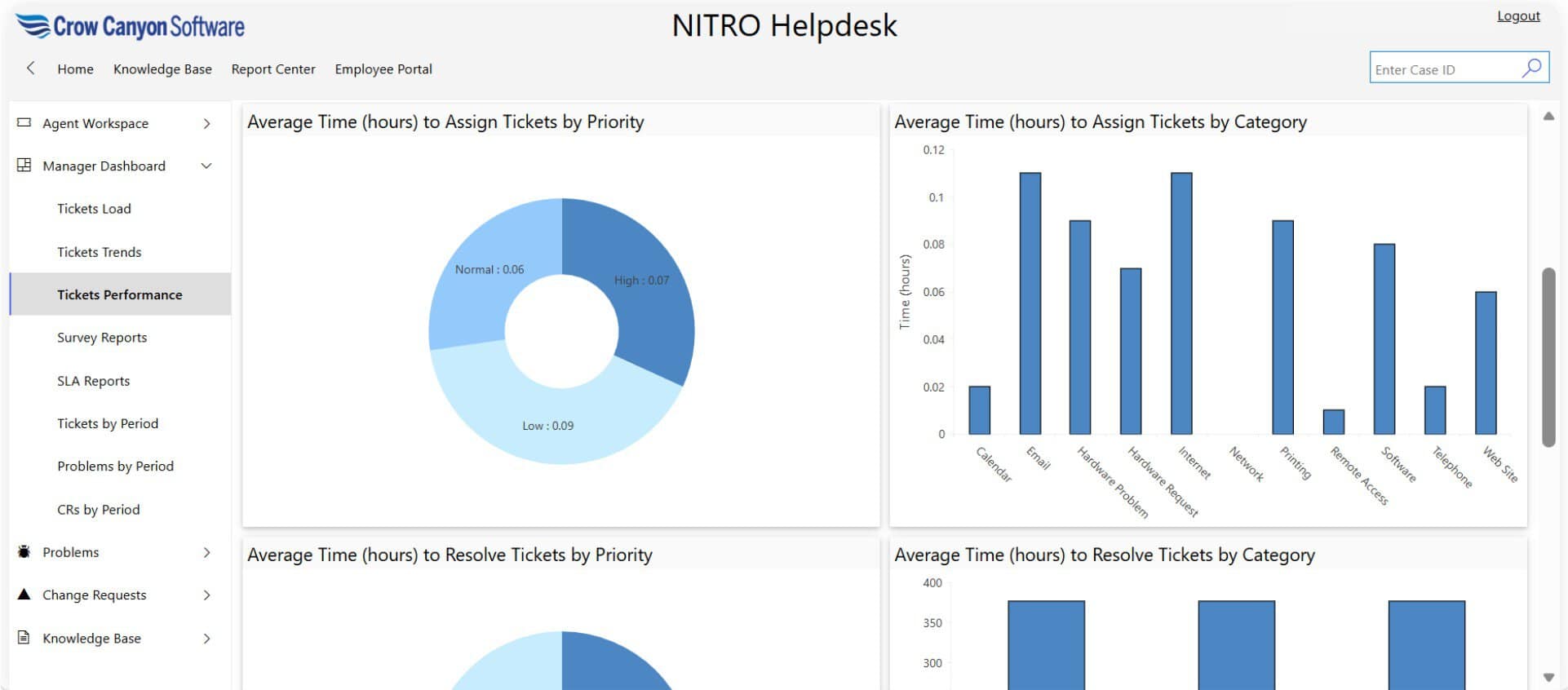
NITRO Help Desk works with Microsoft 365 and can provide ticket management through Microsoft Teams, SharePoint, email, and other service channels.
Key capabilities include:
- Ticket submission and management
- Email-to-ticket
- Microsoft Teams integration
- Automated routing and workflows
- SLA management
- Self-service
- Knowledge management
- Reporting and dashboards
- Custom forms and fields
- Approvals
- AI-assisted ticket management
Unlike building a help desk from individual Microsoft 365 components, a dedicated solution provides the ticketing application and its underlying service-management capabilities as a unified system.
Learn more about NITRO Help Desk
Can You Use Microsoft Teams as a Ticketing System?
Yes, but Teams itself does not provide all of the functionality of a dedicated ticketing system.
Teams can serve as the front end for a help desk, allowing employees and support staff to work in an environment they already use.
A Teams-integrated ticketing system can add capabilities such as:
- Ticket creation
- Ticket numbers
- Assignment
- Prioritization
- SLA tracking
- Automated workflows
- Ticket history
- Knowledge management
- Reporting
If Teams is your primary requirement, see our in-depth guide:
Microsoft Teams Ticketing System: What to Look For in 2026
Is an Office 365 Ticketing System the Same as a SharePoint Ticketing System?
Not necessarily.
SharePoint can be used as the underlying platform for ticket management, but an Office 365 or Microsoft 365 ticketing system can encompass a broader set of Microsoft services.
For example, a complete solution may integrate:
Teams + SharePoint + Outlook + Microsoft 365 + automation
A SharePoint-based ticketing system may therefore be one implementation of a broader Microsoft 365 help desk strategy.
If you’re specifically evaluating SharePoint for ticket management, see:
Using SharePoint as a Ticketing System
Can Microsoft 365 Replace a Traditional Help Desk System?
For some organizations, yes.
Microsoft 365 provides many of the building blocks needed to create a help desk. However, whether it can replace a dedicated help desk platform depends on the organization’s requirements.
A simple internal request process may be handled with Microsoft Lists, SharePoint, Forms, Power Automate, and Teams.
A larger service desk may require a dedicated application to manage:
- Thousands of tickets
- Multiple support teams
- SLAs
- Escalations
- Complex workflows
- Asset information
- Knowledge management
- Self-service
- Reporting
- Approvals
- Automated communications
The more complex the service desk becomes, the more important it is to evaluate the total cost and effort of building and maintaining a custom solution.
How to Choose a Microsoft 365 Ticketing System
Before selecting a solution, answer these questions:
1. Where do users submit requests?
Do you need:
- Teams
- Portal
- Forms
- Multiple channels?
2. How complex are your workflows?
Do requests need:
- Automatic assignment?
- Approvals?
- Escalations?
- Department-specific workflows?
- Automated notifications?
3. Do you need SLAs?
If your support organization tracks response or resolution commitments, SLA functionality should be a core requirement.
4. Do users need self-service?
If many requests are repetitive, a knowledge base and self-service portal can significantly reduce support workload.
5. How important is Microsoft integration?
If your organization already relies heavily on Microsoft 365, Teams, SharePoint, and Outlook, a Microsoft-native or deeply integrated solution can reduce adoption friction.
6. Do you need customization?
Consider whether you need custom:
- Forms
- Fields
- Workflows
- Departments
- Ticket types
- Approval processes
- Reports
7. What are your security and deployment requirements?
Organizations in regulated industries may need to evaluate deployment architecture, permissions, compliance, data residency, and security controls.
Frequently Asked Questions
Does Office 365 have a ticketing system?
Office 365, now generally referred to as Microsoft 365, does not include a dedicated full-featured IT ticketing system. Organizations can build ticketing processes using Microsoft 365 tools such as SharePoint, Microsoft Lists, Forms, Power Automate, Power Apps, and Teams, or deploy a dedicated Microsoft 365 ticketing solution.
Does Microsoft 365 have a help desk?
Microsoft 365 does not include a standalone IT help desk application comparable to dedicated help desk platforms. Microsoft 365 provides tools that can be combined to create help desk functionality, while dedicated solutions provide a more complete ticketing and service management experience.
Can Microsoft Teams be used as a ticketing system?
Microsoft Teams can be used as the user interface for a ticketing system, but Teams itself is not a complete ticketing application. A Teams-integrated help desk can add ticket creation, assignment, workflows, SLAs, reporting, self-service, and other service management capabilities.
What is the best ticketing system for Microsoft 365?
The best solution depends on an organization’s requirements. Organizations should evaluate Microsoft 365 integration, Teams support, email-to-ticket, workflow automation, SLA management, self-service, knowledge management, reporting, security, customization, and deployment options.
Can I build a ticketing system with SharePoint?
Yes. SharePoint and Microsoft Lists can be used to store ticket information, while Power Automate and Power Apps can provide workflows and user interfaces. However, building a complete help desk requires considerably more than simply creating a SharePoint List.
Can Microsoft 365 convert emails into tickets?
Microsoft 365 can be used to automate email-based ticket creation through workflows and applications. A dedicated ticketing system can provide a more complete email-to-ticket process, including ticket assignment, correspondence history, notifications, SLAs, and reporting.
What is the difference between an Office 365 ticketing system and a Microsoft Teams ticketing system?
An Office 365 or Microsoft 365 ticketing system refers broadly to ticket management within the Microsoft ecosystem. A Microsoft Teams ticketing system specifically emphasizes submitting and managing tickets through Microsoft Teams. Teams can be one channel within a broader Microsoft 365 help desk.
Is NITRO Help Desk a Microsoft 365 ticketing system?
Yes. NITRO Help Desk is a dedicated help desk and ticketing solution designed for organizations using Microsoft 365, SharePoint, and Microsoft Teams. It provides ticket management, workflows, automation, reporting, self-service, and AI-assisted support capabilities.
Ready to move beyond basic Microsoft 365 request tracking?
If you’re using Microsoft 365, SharePoint, Teams, or Outlook to manage support requests, a dedicated ticketing system can provide the structure and automation needed to scale your help desk.
Explore NITRO Help Desk or request a demo to see how it can work with your Microsoft environment.
If you’re searching for the best Microsoft ticketing system, you’re likely trying to manage IT, HR, facilities, or service requests inside your existing Microsoft 365 environment. The short answer is:
Microsoft does not include a built‑in, full-featured ticketing system, but you can build one or use a Microsoft‑native solution like NITRO Help Desk.



