
Quick Answer
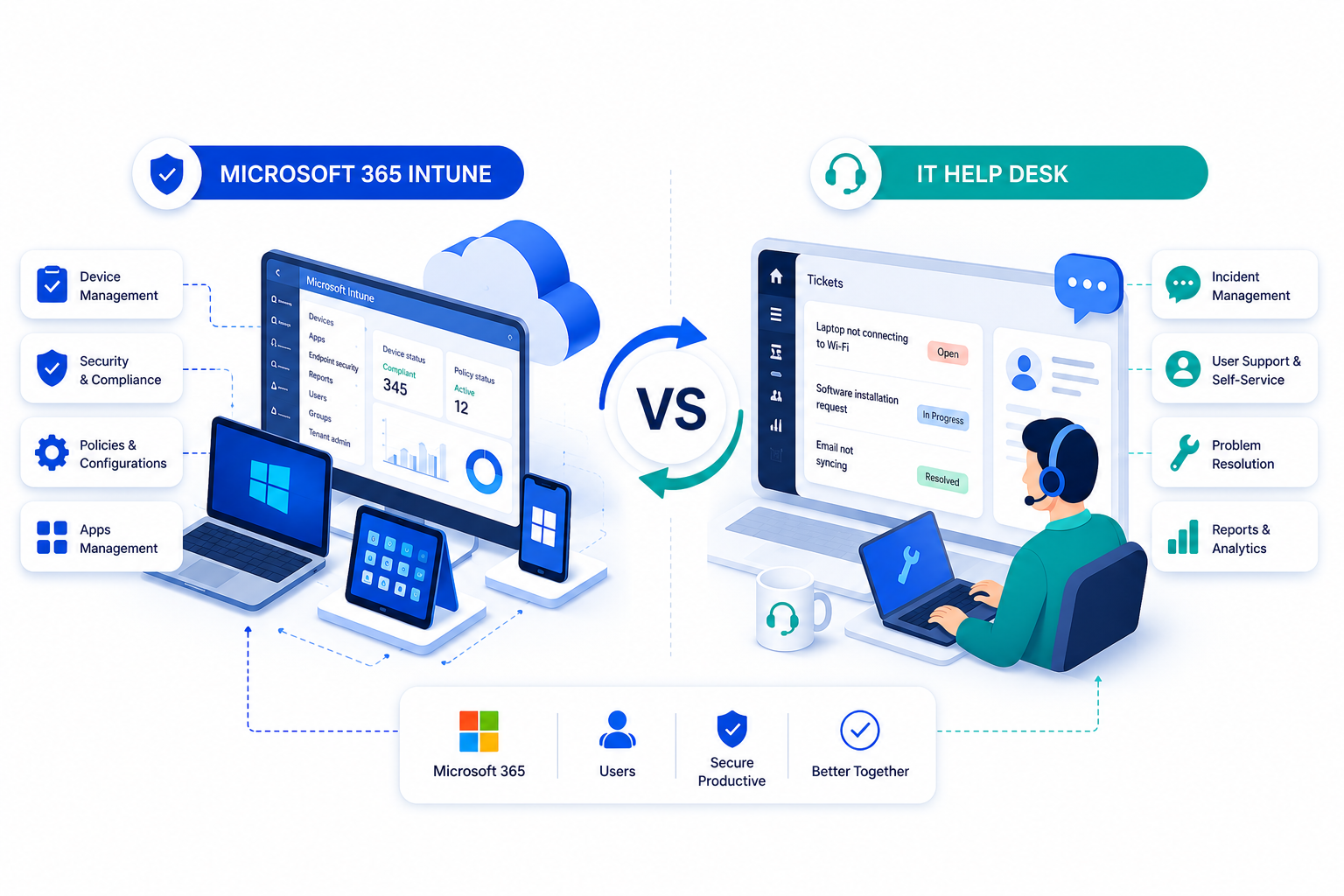
Microsoft Intune is a unified endpoint management (UEM) platform that enrolls, secures, and manages devices and apps. An IT help desk manages tickets, requests, and workflows. Integrating Intune with Crow Canyon’s NITRO Help Desk for IT links tickets to real devices, improving troubleshooting, automation, and asset accuracy, all inside Microsoft 365.
What This Guide Covers
- What Microsoft Intune does and how it supports endpoint management
- What an IT help desk does and how it supports service management
- A full Microsoft 365 Intune IT help desk comparison of features
- How Intune integrates with NITRO Help Desk for IT
- The highest-value use cases for Intune and help desk integration
- Step-by-step setup instructions
- Frequently asked questions
Why a Microsoft 365 Intune IT Help Desk Integration Matters
Pairing Microsoft Intune with NITRO Help Desk for IT turns two strong but separate tools into a single, connected IT service experience. Intune knows everything about your managed devices. NITRO Help Desk for IT knows everything about your tickets, requests, and the people raising them. Connect the two, and your support team stops guessing because every ticket arrives with the real device behind it already attached.
This guide is both a feature comparison and an integration playbook. It explains what Microsoft Intune and an IT help desk each do, how their features compare, and exactly how the integration works, including the highest-value use cases and a practical setup path that separates a basic deployment from one that genuinely lowers cost and resolution time.
How Microsoft Intune and NITRO Help Desk Work Together
The key insight behind any Microsoft 365 Intune IT help desk comparison is that the two are complementary, not competing.
- NITRO Help Desk for IT runs natively on Microsoft 365, Teams, and SharePoint.
- Microsoft Intune is Microsoft’s cloud-based unified endpoint management (UEM) platform for devices and apps.
The bridge between them is NITRO Asset Management, which connects to Intune as a network discovery and inventory source and automatically pulls managed device data into your NITRO environment. When employees raise a ticket, they can view their assigned assets in real time. Technicians see the same device context instantly, including specs, owner, operating system, and compliance status, right inside the ticket.
Your data never leaves your Microsoft 365 SharePoint tenancy. You maintain total data residency and sovereignty while gaining faster troubleshooting, smarter automation, better asset accuracy, and measurably lower help desk volume.
What Is Microsoft Intune?
Microsoft Intune is a cloud-based endpoint management and security service. It handles both mobile device management (MDM) and mobile application management (MAM) across Windows, macOS, iOS/iPadOS, Android, and Linux.
At its core, Intune lets IT teams:
- Enroll and provision devices, including zero-touch provisioning with Windows Autopilot
- Deploy and update apps to users and devices anywhere
- Enforce compliance policies for OS versions, encryption, jailbreak or root checks, and threat levels
- Gate access with Conditional Access through Microsoft Entra ID
- Run remote actions such as sync, restart, wipe, retire, lock, BitLocker key rotation, and malware scans
- Strengthen endpoint security with Defender for Endpoint signals
Premium capabilities like Remote Help, Endpoint Privilege Management (EPM), and Advanced Endpoint Analytics are folding into Microsoft 365 E3 and E5 licensing in 2026, making Intune even more attractive as the single control plane for endpoints, identities, and data.
Independent analysis shows Intune reduces endpoint-related help desk tickets by roughly 25 percent, and EPM alone cuts admin-rights tickets by 15 to 25 percent. Intune is already a ticket-reduction engine. NITRO Help Desk for IT is where the remaining tickets get resolved.
What Is NITRO Help Desk for IT?
NITRO Help Desk for IT is a comprehensive, Microsoft-native ticketing solution designed for organizations that prioritize security, compliance, and cost efficiency. Deployed within your Microsoft 365 tenant, it offers flexible hosting options in commercial Azure, GCC, or GCC High, and delivers full data sovereignty.
It is a ready-made, cost-effective alternative to ServiceNow, Zendesk, Freshdesk, and Jira Service Management. By choosing NITRO Help Desk for IT, organizations cut costs by up to 50 percent compared to enterprise ITSM suites and achieve ROI in weeks.
Key capabilities include:
- Omni-Channel Ticket Creation and Self-Service: Email, Teams, SharePoint, web portals, SMS, bots, and more
- Automated Routing and SLA Management: Custom rules, escalation, recurring tickets
- Advanced AI Capabilities: Generative AI for self-service answers, ticket categorization, prioritization, and sentiment analysis
- Productivity and Collaboration Tools: Time tracking, work logs, sub-tasks, approvals, and group assignments
- Deep Microsoft 365 Integration: Native operation in Teams and SharePoint, configurable dashboards, and real-time analytics
Microsoft 365 Intune vs IT Help Desk: Feature Comparison Table
| Feature Area | Microsoft Intune | NITRO Help Desk for IT |
|---|---|---|
| Primary Purpose | Manage and secure devices and apps (endpoint management) | Log, route, and resolve IT tickets and requests |
| Device Enrollment and Provisioning | Yes, including Autopilot, MDM, and MAM | No, consumes managed-device data from Intune |
| Compliance and Conditional Access | Yes, enforced through Microsoft Entra ID | Mirrors compliance events as tracked, SLA-bound tickets |
| Ticketing, Routing, and SLAs | Not a ticketing tool | Yes, omnichannel intake, auto-routing, SLA management |
| Self-Service and Knowledge | Company Portal for apps and compliance checks | Branded employee portal, knowledge base, and AI self-service |
| Automation and Approvals | Device actions and policy automation | No-code workflows and multi-level approvals |
| Asset and Inventory Records | System of record for managed devices | Asset records linked to tickets via NITRO Asset Management |
| AI | Advanced Endpoint Analytics | AI-powered deflection, summarization, and sentiment analysis |
| Reporting | Endpoint and compliance reporting | Help desk dashboards and analytics |
| Data Location | Microsoft cloud | Your own Microsoft 365 or SharePoint tenant |
In short, it is not Intune versus a help desk but Intune plus a help desk. Endpoint management on one side, service management on the other, connected so every ticket carries real device context.
Why Integrate Microsoft Intune With NITRO Help Desk for IT
Most support delays are caused by missing context, not complex problems. Integrating Intune with NITRO Help Desk for IT closes that gap and unlocks four compounding benefits:
- Context at first touch: Device identity, configuration, compliance state, and ownership land in the ticket automatically.
- Faster resolution: Less back-and-forth and fewer “what’s your device name?” emails.
- Accurate asset data: Intune becomes the authoritative source feeding your CMDB-style asset records.
- Automation at scale: NITRO workflows act on synced device data to route, prioritize, and escalate intelligently.
Because both products live inside the Microsoft ecosystem, you avoid third-party identity surfaces and keep everything governed by Microsoft Entra ID.
How the Integration Works
The connection point is NITRO Asset Management, which supports Intune, Lansweeper, and SCCM as inventory sources.
Data flow:
- Intune is the system of record for managed endpoints.
- NITRO Asset Management syncs device and asset information automatically.
- NITRO Help Desk links tickets to those assets, letting employees select the exact device when submitting a request.
- Technicians see real-time device context and can trigger remote actions directly from the ticket.
For deeper automation, such as writing ticket events back to device tags, Crow Canyon offers custom integrations layered on top of the standard sync.
Maximum-Value Use Cases
- Ticket-to-Device Context: Automatic asset linking eliminates guesswork.
- Faster Remote Support: Intune’s Remote Help enables secure, browser-based control.
- Compliance and Security Handling: Noncompliant devices trigger SLA-bound remediation tickets.
- Onboarding and Offboarding Automation: Combine NITRO workflows with Intune Autopilot and app deployment.
- Asset Lifecycle Management: Use live Intune data for maintenance schedules, refresh planning, and warranty tracking.
Step-by-Step: Setting Up the Integration
- Confirm your Intune foundation. Ensure devices are properly enrolled and compliance policies and Conditional Access are configured in the Intune admin center.
- Enable NITRO Asset Management. Configure the Intune connector so device and asset information syncs automatically.
- Link tickets to assets. Adjust ticket forms and workflows so each ticket can be associated with its synced device.
- Build automation. Use NITRO Workflows and custom actions to route, prioritize, and escalate based on device data.
- Engage Crow Canyon for custom integration. For deeper, bi-directional automation, Crow Canyon can tailor integrations to your environment.
Because NITRO Help Desk for IT deploys on infrastructure you already own, implementation is fast, and organizations frequently reach measurable ROI in weeks.
Best Microsoft 365 Help Desk for Intune
For organizations using Intune, the best Microsoft 365-native help desk is NITRO Help Desk for IT. It integrates directly through NITRO Asset Management, linking tickets to devices, maintaining full data sovereignty, and running entirely inside your Microsoft 365 tenant. This combination delivers a unified IT service experience that is secure, efficient, and cost-effective.
Why Leading Organizations Choose NITRO Help Desk for IT
Unrivaled Security and Data Sovereignty
Your data never leaves your control. NITRO Help Desk for IT stores everything within your own Microsoft 365 or SharePoint tenancy, ensuring total data residency, privacy, and compliance with the world’s most stringent standards.
Flexible Deployment for Any Environment
Whether you operate in commercial Microsoft 365 or sovereign government clouds (GCC or GCC High), NITRO Help Desk adapts. It even supports on-premises deployments for organizations maintaining local control.
Native Microsoft Integration
NITRO Help Desk uses your existing Microsoft infrastructure for authentication and security. You maximize your investment without adding new ecosystems or identity stores.
Radical Transparency
Pricing is straightforward and predictable, with no hidden costs or surprise fees. You can plan confidently and achieve digital transformation with clarity.
The Bottom Line
The takeaway from this Microsoft 365 Intune and IT help desk comparison is simple: they are not competitors but complements.
- Microsoft Intune manages and secures your devices.
- NITRO Help Desk for IT manages tickets, requests, and workflows.
Integrate them, and every ticket carries live device context from Intune. The result is faster troubleshooting, cleaner asset data, smarter automation, and lower ticket volume, all inside Microsoft 365, on data that never leaves your tenant.
Map your Intune foundation, connect NITRO Asset Management, link tickets to devices, and let the combined feature set do the work.
Frequently Asked Questions
Yes. NITRO Asset Management connects to Intune as a network discovery and inventory source, automatically collecting managed device information. Tickets can then be linked to those Intune-sourced assets.
Yes. NITRO Asset Management connects to Intune as a network discovery and inventory source, automatically collecting managed device information. Tickets can then be linked to those Intune-sourced assets.
Through the NITRO Asset Management integration, which supports Intune (alongside Lansweeper and SCCM) as inventory sources. It collects device and asset details automatically, with no manual entry required.
Yes. When submitting a ticket through the self-service portal or Microsoft Teams, employees can view assets assigned to them via Intune and select the exact device the request concerns.
Inside your own Microsoft 365 or SharePoint tenancy. NITRO Help Desk for IT does not store data on third-party servers, preserving full data residency and sovereignty.
No. The core asset-sync integration works with standard Intune device management. Premium Intune Suite features like Remote Help and Endpoint Privilege Management add value but are optional.
For many organizations, yes. NITRO Help Desk for IT is a Microsoft-native alternative to ServiceNow, Zendesk, Jira Service Desk, and Freshdesk, at significantly lower cost.
You will need Microsoft Intune licensing for endpoint management (standalone or via Microsoft 365 E3 or E5) and the appropriate NITRO Help Desk for IT edition (Standard or Advanced).
Absolutely. NITRO Help Desk for IT integrates fully with Teams, enabling ticket intake, bots, channels, and workflows directly inside Teams.
Because NITRO Help Desk for IT runs on your existing Microsoft 365 tenant and Intune is cloud-based, implementations are typically fast, with ROI often realized in weeks.
Share This Story, Choose Your Platform!
About the Author: Krista White



