
Updated August 2026
Not long ago, choosing a workflow automation tool was a pretty short exercise for organizations built around Microsoft 365, Teams, and SharePoint. You bolted something onto SharePoint Designer, got the process moving, and moved on with your day. That approach doesn’t hold up anymore.
The real test in 2026 looks different: does the tool actually work with the platform you already run, or fight against it? How fast can you get something live? Are the AI features genuinely useful, or just a bullet point on a sales deck? And what happens to the cost once you’re past your third or fourth workflow, not just your first? If you’re specifically evaluating workflow automation software for a Microsoft 365 or SharePoint environment, that platform-fit question tends to matter more than anything else on the list.
The quick verdict: for organizations already running Microsoft 365 or SharePoint, NITRO Studio is the strongest fit in 2026, it’s one of the few forms-and-workflow platforms that runs natively on both SharePoint Online and SharePoint On-Premises with the same no-code toolset, and it doesn’t force AI on customers who’d rather leave it off. The rest of this guide walks through why, and what to check for if you’re comparing options yourself.
What a Great Workflow Automation Tool Does
Strip away the marketing language, and a good workflow automation tool really needs to do a handful of things well:
- Model processes visually, with drag-and-drop designers, forms, rules, and steps
- Automate routing, approvals, SLAs, escalations, and notifications end to end, not just the easy parts
- Plug into the rest of your stack, from Microsoft 365, Teams, and SharePoint to ERPs, CRMs, and other line-of-business apps
- Show you what’s actually working, through dashboards and KPIs you can adjust without a rebuild
- Scale without turning into sprawl, using reusable components, environment promotion, and real lifecycle management
- Work for two very different audiences at once, no-code for business analysts, low-code extensibility for developers who need more control
- Put AI to work where it earns its keep, smart routing, summarization, knowledge surfacing, and chatbot-style assistance
How to Choose the Best Workflow Automation Tool: A 2026 Checklist
Whether you’re comparing SharePoint workflow automation software, looking for a Power Automate alternative, or evaluating a broader Microsoft 365 automation platform, the decision usually comes down to six things.
1) Fit for Your Core Platform
Start here. If your organization already runs on Microsoft 365 and SharePoint, the tool should work with your existing lists, libraries, columns, and permissions, not force everything into a separate system just because that’s easier for the vendor. Teams matters too. Approvals and notifications are far easier to keep moving when they show up where people already work, instead of in one more app they have to remember to open.
2) Speed from Idea to Production
Teams that move quickly tend to have three things in place before they start building:
- A no-code/low-code form designer with conditional logic and validation
- A visual workflow builder with triggers, actions, branches, and timers
- Templates or example workflows for common processes like onboarding, purchase requests, and IT tickets, so you’re not always starting from a blank canvas
3) Integration and Extensibility
A workflow tool that can’t talk to the rest of your stack just becomes its own silo. Outlook and Exchange, Excel, OneDrive, ERPs, CRMs, SQL databases, REST APIs, webhooks, these are the baseline. For the odd cases that don’t fit neatly into a template, low-code hooks like PowerShell or Azure Functions can make the difference.
4) Transparent Total Cost of Ownership
Cost is where a lot of workflow platforms quietly get messy. Pricing should grow with your organization, not jump every time someone adds a new flow or step. Good admin tooling also heads off what a lot of IT teams call “shadow automation,” where every department builds its own disconnected flows because nobody’s watching.
5) Measurable Outcomes
The best workflow automation software makes results visible instead of implied. Dashboards showing cycle time, SLA performance, handoffs, and rework tell you whether a process is actually improving, and make it easier to spot the next bottleneck before it turns into a bigger problem.
6) AI That Is Practical, Not Hype
By 2026, AI isn’t a nice-to-have in workflow automation software, most buyers expect it going in. The real question is whether the capabilities hold up in daily use, not just in a product demo:
- Ticket and record categorization and routing
- Summary generation and reply suggestions
- Knowledge surfacing from SharePoint sites and documented SOPs
- No-code visual builders to accelerate initial form layout and workflow setup.
Why NITRO Studio Is the Best Workflow Automation Tool for Microsoft 365 and SharePoint in 2026
Here’s how NITRO Studio holds up against that checklist, point by point.
Microsoft 365, Teams, and SharePoint Native by Design
NITRO Studio works directly with SharePoint lists, libraries, views, metadata, and security, so nothing gets silently duplicated into a separate database somewhere else. Teams integration brings approvals, updates, and notifications into the place where employees already spend most of their day. The goal is to extend your existing Microsoft 365, Teams, and SharePoint investment, not replace it with something new to learn.
No-Code and Low-Code Without Compromise
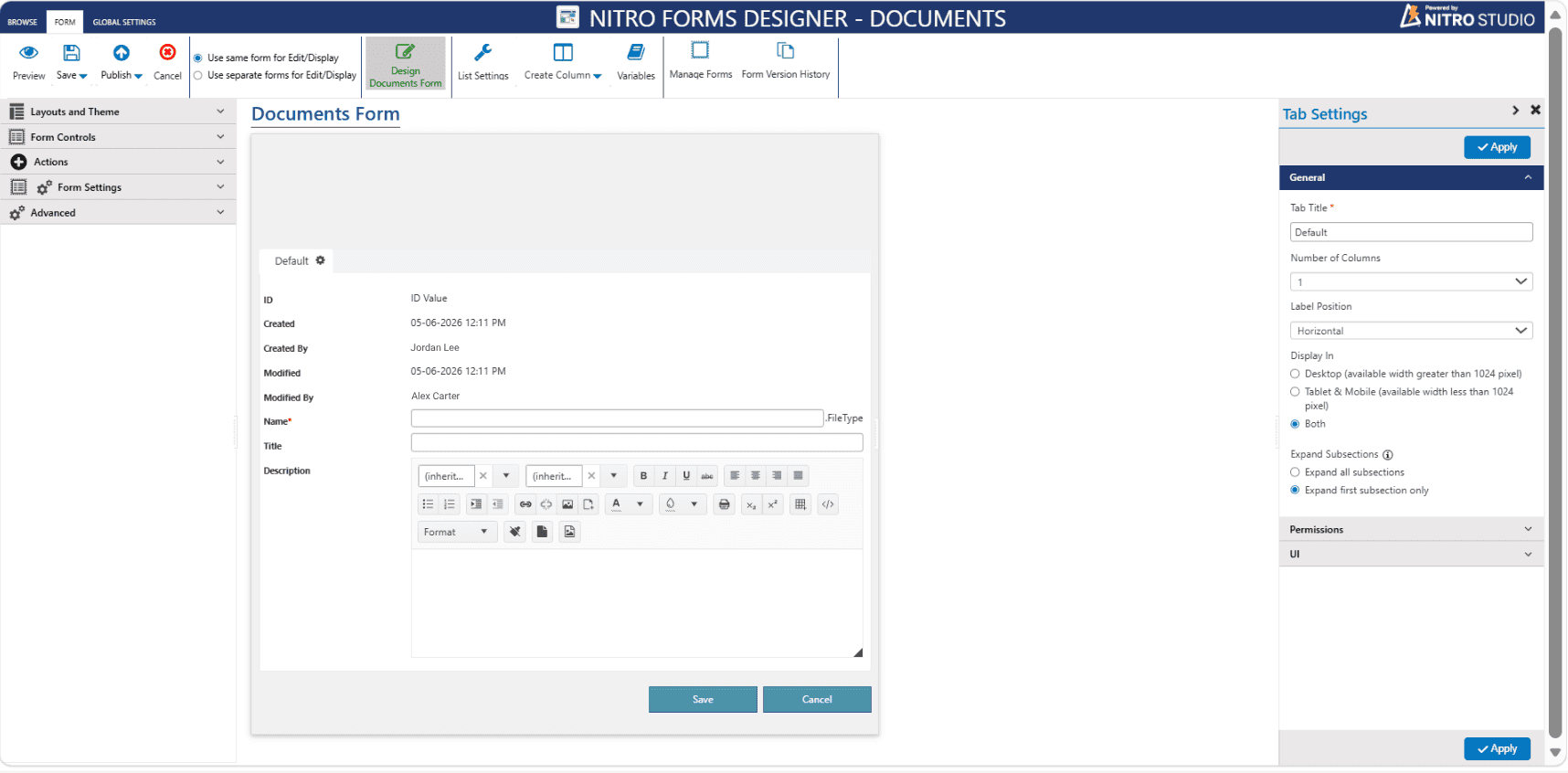
Five core pieces make up NITRO Studio: Forms, Workflows, Reports, Alerts, and Dashboards. Forms come from the NITRO Forms Designer, a WYSIWYG, drag-and-drop tool that gives you control over how data is displayed and how user input is handled, tabs, sections, conditional fields, validation, and file capture, all without writing code. Features like cascaded lookups, electronic signatures, and database connections that pre-populate fields cover the more advanced cases InfoPath users tend to ask about.
Workflow logic runs on a separate tool, the Visual Workflow Designer, a drag-and-drop canvas where you piece together actions and decision points, a Start marker, branching Gateways, and any number of linked steps, so you can see at a glance how a process actually flows. Sixteen action types cover the processes teams automate most, approvals, escalations, auto-assignment, notifications by email, text, or Teams, and document generation, and a built-in Debug tool lets you run a workflow in test mode first, catching errors and misconfigurations before anything reaches production.
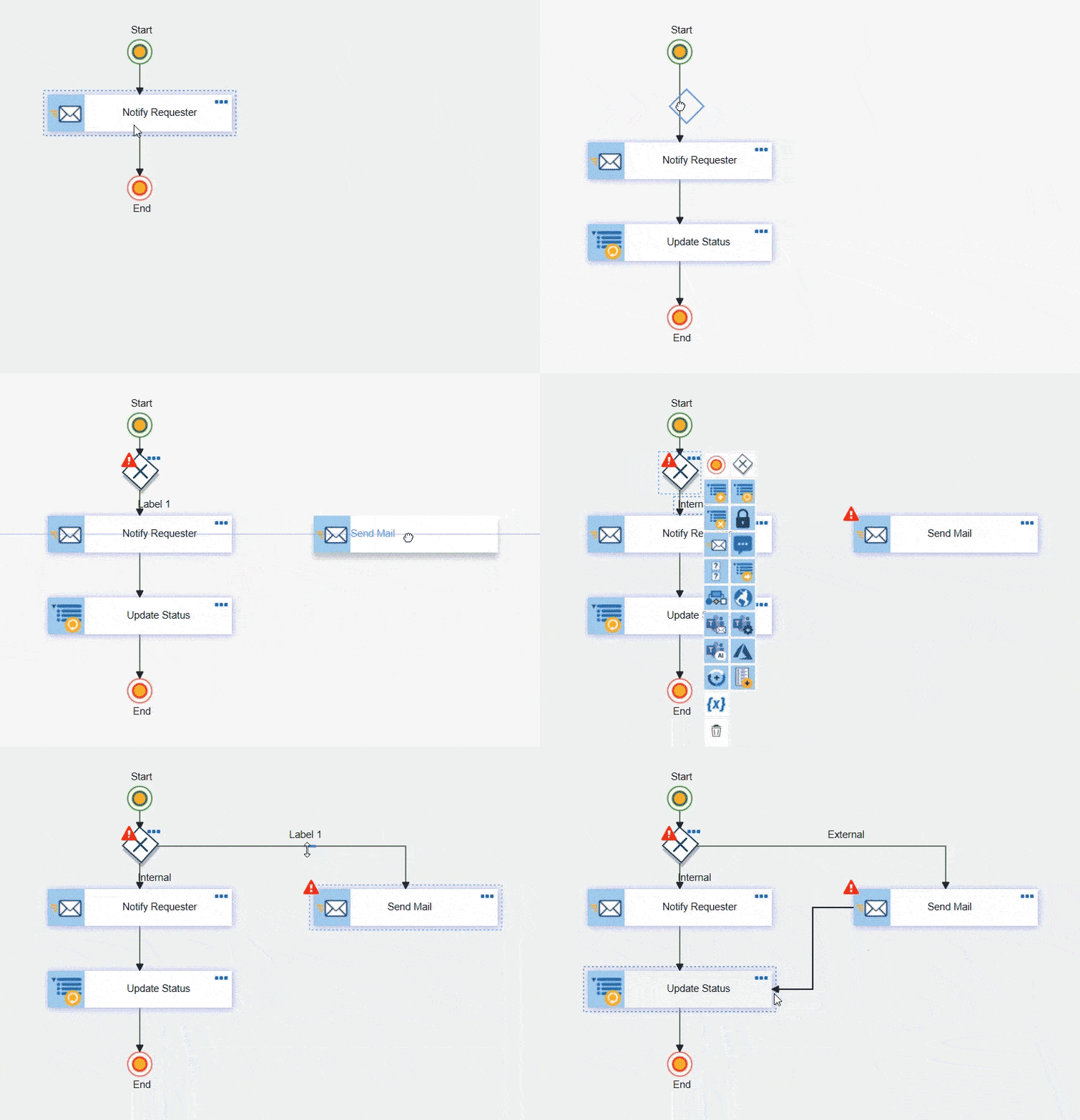
On the action side, a single workflow can send email and text notifications, create or update SharePoint items, interact directly with Microsoft Teams, invoke web services, scripts, or Azure Functions, kick off other workflows, and generate or send documents automatically.
Business analysts can build and adjust most of this without writing code. When a process needs something more advanced, developers still have low-code options available, but it’s the exception rather than the default path.
Worth being clear about what’s included where: core NITRO Studio is the building kit itself, so an onboarding process, a purchase request flow, or a ticketing system is something you build using Forms, Workflows, and the rest of the toolset, not something that arrives pre-assembled. If you’d rather deploy something ready-made instead of building it yourself, Crow Canyon also sells separate, prebuilt modular applications, Onboarding System, Purchase Request System, NITRO Help Desk for IT, and others, each priced and licensed on its own.
Deployment Flexibility: Online or On-Premises
NITRO Studio isn’t locked into one deployment model. It comes in two versions, with support reaching into government cloud environments as well:
- On-premises version, for SharePoint 2016, 2019, and Subscription Edition, including connected and air-gapped environments. All data stays inside your own SharePoint farm, which matters for organizations with strict data residency or compliance requirements.
That distinction matters because very few modern forms and workflow tools still support on-premises SharePoint in any meaningful way. Microsoft’s own Power Platform doesn’t run directly in on-premises SharePoint environments at all.
- Online version, runs directly in your Microsoft 365 tenant and integrates fully with Teams. Online deployments are Azure-hosted and cover the commercial, GCC, and GCC High environments. Commercial can be hosted in either your organization’s own Azure environment or Crow Canyon’s, while GCC and GCC High are customer-hosted only.
Broad Integration With the Tools You Already Use
The connector list is another practical edge. Beyond Microsoft 365, Teams, and SharePoint, NITRO Studio connects with tools most organizations are already running:
- Microsoft ecosystem: Office 365, Microsoft Intune, SCCM, Microsoft Excel, Microsoft SQL Server, and REST APIs for custom connections
- CRM and ERP: Salesforce, Oracle, general ERP connections, and QuickBooks
- Communication and e-signature: Twilio and Adobe Acrobat Sign
- Cloud storage and file management: Dropbox, Google Drive, and Box
- IT and asset management: Lansweeper
- HR: ADP
That range helps when the goal is fewer scattered point solutions, not one more disconnected app bolted onto the stack.
AI, Available When You Want It
For a lot of NITRO Studio customers, especially on-premises deployments in regulated industries, AI isn’t the reason they buy. It’s useful, but it’s not the deciding factor.
Where NITRO Studio does use AI, it runs on Azure OpenAI, using models like GPT-4o, hosted inside your organization’s own Azure environment rather than a shared external service. That matters for IT teams with a compliance requirement around where their data goes and which model gets to touch it.
NITRO Copilot is the AI assistant embedded across the platform, helping users move faster on existing tickets, workflows, and documents. Day to day, across NITRO Studio and the applications built on it, that includes:
- Ticket summarization and AI-driven ticket assistance, built directly into NITRO Forms
- AI-generated email drafts through the AI-Powered Email Manager, for customer replies or internal routing
- Document Intelligence in NITRO Workflows, which extracts, classifies, and analyzes document content for smarter routing and approvals
- Natural language prompting for NITRO Reports, so a manager can ask for a chart in plain language instead of building one manually
- Email Sentiment Analysis, which flags a dissatisfied customer’s message before it escalates
- NLP-based knowledge base search, so users can type a question naturally instead of guessing the right search terms
- Ticket summarization, sentiment and urgency analysis, auto-categorization and routing, and AI-generated first response emails, in the applications built on NITRO Studio.
Most of this gets used through NITRO Engage, a conversational bot for Microsoft Teams that lets employees create requests, check status, and get AI-guided answers without leaving a chat window.
Switch all of it off and nothing else changes. Forms, workflows, and reporting run exactly the same way with or without AI turned on, which is precisely why banking, healthcare, government, and other regulated customers aren’t forced to accept an AI layer just to get the automation itself.
Governance, Control, and Scale
Governance runs through how NITRO Studio gets managed day to day. Versioning and audit logs cover forms, workflows, and related assets, so nothing changes without a trail. Moving from dev to test to production, with rollback available, keeps changes safe even when someone gets it wrong. Permissions follow your existing SharePoint and Azure AD setup, and predictable licensing means no surprise costs as usage grows.
Outcome-Focused Analytics
The reporting side exists to show whether work is actually moving, not just whether it looks busy. Dashboards track SLA compliance, cycle times, and backlog trends, with bottleneck detection built in so you’re not left digging for the next fix.
Flat-Rate, Predictable Pricing
NITRO Studio’s pricing scales by user count within your Microsoft 365 tenant or SharePoint on-premises farm, not by flow, action, or step, and non-profit, government, and education customers can qualify for discounts.
See current NITRO Studio pricing for full tier details, or request a demo. There’s also a 30-day free trial across the product line, so you can test the fit before committing to anything.
Common Use Cases (Ready Day One)
Most teams don’t start from a blank slate. These are the prebuilt applications NITRO Studio customers tend to deploy first, each sold separately from the core platform:
- IT: ticketing, change requests, asset onboarding and offboarding, using NITRO Help Desk for IT or Asset Management
- HR: employee onboarding, policy acknowledgments, leave requests, using NITRO Help Desk for HR
- Finance: purchase requests, approvals, purchase order lifecycle management, using the Purchase Request System
- Compliance: document approvals, training attestations, audit evidence trails, using Service Desk for cross-departmental requests
A Proven Power Platform Alternative and Nintex Alternative
For organizations still relying on InfoPath, SharePoint Designer, Lotus Notes, or Microsoft Access forms, NITRO Studio offers a more direct modernization path. Teams keep the underlying SharePoint data in place instead of rebuilding every process from scratch.
Air Wisconsin shows what that looks like in practice. The airline needed to replace more than 400 InfoPath forms and SharePoint Designer workflows after Microsoft retired both, across a hybrid SharePoint 2019 and Microsoft 365 environment. After comparing NITRO Studio against Nintex, the team picked NITRO Studio for its forms tool and ease of use. Lori Popoff, the airline’s Systems Administrator, has said the platform came out roughly ten times cheaper than Nintex and easier to use than Microsoft’s own Power Platform.
NITRO Studio is also a common Power Platform alternative for teams that have run into the limits of Microsoft’s own low-code suite, particularly around on-premises support. Per Microsoft’s own support documentation, Power Platform components like Power Automate aren’t natively available in a SharePoint Server on-premises environment. Teams need an on-premises data gateway just to connect back to the cloud service and use it at all. NITRO Studio skips that step and runs natively on-premises.
And as a Nintex alternative, it’s positioned around lower total cost and simpler licensing, without giving up the branching, escalation, and rule-based depth Nintex customers rely on.
Here’s how the three stack up side by side:
| Capability | NITRO Studio | Microsoft Power Platform | Nintex / K2 |
|---|---|---|---|
| Runs natively inside SharePoint/M365 | Yes, built in | Partially, cloud-only (split across separate apps) | No, K2 is a separate platform |
| On-premises support | Yes, SharePoint 2016, 2019, Subscription Edition | No, needs an On-Premises Data Gateway | Yes, via K2 |
| GCC / GCC High support | Yes, both, including customer-hosted | Yes, but Copilot/AI feature rollouts are delayed in sovereign clouds | No Microsoft-branded GCC/GCC High; separate FedRAMP Moderate gov cloud |
| No-code / low-code | Both | Mixed: simple forms/flows are no-code, but complex logic requires Power Fx/dev skills | No-code designer |
| Document generation (PDF/Word) | Native built-in tool | Premium connectors or third-party add-ons required | Built-in DocGen tool |
| Legacy InfoPath/workflow migration | Direct data-structure path with conversion utilities | Manual rebuild required from scratch | Custom migration utilities for legacy Nintex |
| Solution lifecycle & ALM | Direct sandbox-to-prod promotion and built-in rollbacks | Complex ALM (requires Azure DevOps, Pipelines, or Managed Environments) | Enterprise package/deployment environment controls |
| AI | Azure OpenAI (GPT-4o) running inside customer’s Azure environment | Microsoft Copilot Studio and Azure OpenAI integration | Locally-hosted, on-premises AI options |
| Pricing model | Flat annual rate (unlimited forms/workflows) | Modular per-user/per-app licensing plus extra costs for premium connectors | Not published; usage-plus-user hybrid, add-ons extra |
| Best fit | SharePoint/M365 orgs wanting all-in-one no-code automation without per-user lock-in | Cloud-only M365 shops already invested in full Microsoft licensing | Organizations invested in K2 |
Real-World Results
Winchester District Memorial Hospital: moved roughly 1,800 active workflows off Nintex and InfoPath in about five weeks, including its mission-critical eConsult referral system. Faster performance, a more mobile-friendly interface, less troubleshooting after the migration. For any organization worried about a long, disruptive Nintex migration, that timeline alone is worth paying attention to.
Ventura Foods: a California-based food manufacturer behind brands like Hidden Valley and Marie’s dressings, was managing quality assurance communications by email and attachments with no formal process in place. A non-technical QA team built four separate tracking and management tools directly on NITRO Studio, without writing code, turning Microsoft 365 into a genuine business process automation platform. Rodrigo Vargas, Senior Manager of Supply Chain Quality, has said:
“NITRO Studio conquered many of SharePoint’s out-of-the-box limitations and made it easier to do many tasks that previously were labor-intensive and required coding, and was much more affordable than other solutions we were looking at, such as Nintex.”
Smaller organizations see the same kind of payoff. Just at a different scale.
“Got up and going pretty quickly” with their first workflow, despite having no technical background on staff, and found it easy to delegate implementation across stakeholders instead of relying on one specialist.
— Kenneth, Retail CEO, 5-star Capterra review
An IT director at a global nonprofit has built more than 100 automated processes on NITRO Studio, and describes it as more flexible and cost-effective than other platforms the organization evaluated. A CIO at a public housing authority credits the platform with eliminating manual workflows and legacy systems entirely within SharePoint.
More case studies are available here.
User Reviews
Third-party review platforms tell the same story from outside Crow Canyon’s own marketing. NITRO Studio holds a 4.9 out of 5 rating on softwarereview.com, and is also reviewed independently on Capterra, GetApp, and Software Advice, exactly the kind of independent evidence worth checking before you put a vendor on a shortlist.
Example Architecture (At a Glance)
A typical request moves through six stages, start to finish:
- Trigger: a SharePoint form is submitted, or an email arrives
- Rules: the request gets validated and classified
- Routing: it’s assigned to a queue or channel, with SLA timers and escalations set
- Actions: notifications go out via Teams and Outlook, tasks get created, records get updated
- AI Assist: the request is summarized, a resolution is suggested, and related knowledge is surfaced
- Analytics: a dashboard tracks cycle time, SLA percentage, and workload balance in the background
Implementation Tips for Faster Wins
- Start with one high-friction workflow, such as purchase approvals, and ship it in two to four iterations rather than one big-bang release
- Templates and reusable components make it much easier to replicate an early win across other departments
- Instrument KPIs on day one, cycle time, SLA, rework, and actually review them monthly, not just set them up and forget
- A center of excellence helps here, naming standards, a solution catalog, a promotion process
- Pair a business process owner with an IT steward on each build, so ownership doesn’t quietly drift over time
Conclusion: The Best Workflow Automation Tool for 2026 and Beyond
The best workflow automation tool should feel practical from the first project and keep holding up as usage grows across the organization. Easy enough for business teams to run on their own, governed enough for IT to trust, backed by AI where that actually helps, and closely tied to the systems where people already work. For organizations on Microsoft 365, Teams, or SharePoint, cloud-based or on-premises, NITRO Studio delivers a strong balance of speed, control, integration depth, and predictable cost.
|
Ready to see how it fits your own environment? Start with a free 30-day trial, or request a demo and see NITRO Studio in action for yourself. |



