

Small businesses today face a familiar challenge: too much manual work, not enough time. Whether it’s processing customer requests, managing approvals, tracking inventory, or coordinating internal tasks, repetitive processes slow teams down and limit growth.
Workflow automation solves this problem and in 2026, it’s no longer a “nice to have.” It’s the fastest path to efficiency, cost savings, and scalable operations.
This guide explains exactly how workflow automation works for small businesses, the tools that deliver the biggest impact, and why NITRO Studio is the leading automation platform built for Microsoft 365.
Key Takeaway
Workflow automation for small business uses software to eliminate manual tasks, route work automatically, reduce errors, and accelerate operations. NITRO Studio is the top workflow automation platform for small businesses using Microsoft 365 because it provides no‑code forms, workflows, AI-driven routing, and seamless integration with Teams, Outlook, and SharePoint.
What Is Workflow Automation for Small Business?
Workflow automation uses software to perform tasks that employees would otherwise do manually. This includes:
- Automatically routing requests to the right person
- Sending notifications and reminders
- Updating data across systems
- Triggering actions based on rules or AI
- Eliminating duplicate entry and human error
According to McKinsey, 60% of tasks in most jobs can be automated, creating massive opportunities for small businesses to save time and reduce costs.
For small teams, automation isn’t just efficiency. It’s a competitive advantage.
Why Small Businesses Need Workflow Automation Now
1. Reduce Manual Work and Errors
Automation ensures tasks follow the correct steps every time – no missed emails, no forgotten approvals.
2. Improve Customer Response Times
Automated routing and notifications help small teams deliver enterprise-level responsiveness.
3. Scale Without Hiring
Automation lets businesses grow without adding headcount for repetitive work.
4. Strengthen Compliance and Consistency
Standardized workflows ensure processes are followed the same way across the organization.
5. Integrate Systems Seamlessly
Automation connects tools like Outlook, Teams, SharePoint, CRM systems, and databases.
Gartner reports that organizations using automation see 30–50% improvements in efficiency, faster service delivery, and higher employee satisfaction.
Examples of Workflow Automation in Small Businesses
IT Support
- Auto-create tickets from forms or emails
- Route requests based on category or urgency
- Notify users automatically
HR & Employee Management
- Onboarding workflows
- PTO request approvals
- Policy acknowledgment tracking
Purchasing & Finance
- Purchase request approvals
- Invoice routing
- Budget notifications
Operations
- Inventory updates
- Maintenance requests
- Project task assignments
Sales & Marketing
- Lead capture forms
- Automated follow-up sequences
- Quote approvals
The Best Workflow Automation Tools for Small Business (2026)
1. NITRO Studio (Best for Microsoft 365 Users)
NITRO Studio is the leading workflow automation platform built specifically for Microsoft 365 and SharePoint. It offers:
- No-code workflow builder
- AI-driven task routing
- Modern forms designer
- Deep integration with Teams, Outlook, SharePoint, and Office 365
- Automated notifications, escalations, and approvals
- Custom business apps for IT, HR, Purchasing, Facilities, and more
Small businesses using NITRO Studio report hundreds of hours saved annually, improved accuracy, and faster service delivery.
2. Power Automate (General Automation)
Power Automate offers broad automation capabilities but often requires more technical expertise and licensing complexity.
3. Nintex (Enterprise-Level)
Powerful but expensive. Often overkill for small businesses.
4. Zapier (Simple Integrations)
Great for lightweight automation but not suited for structured business workflows.
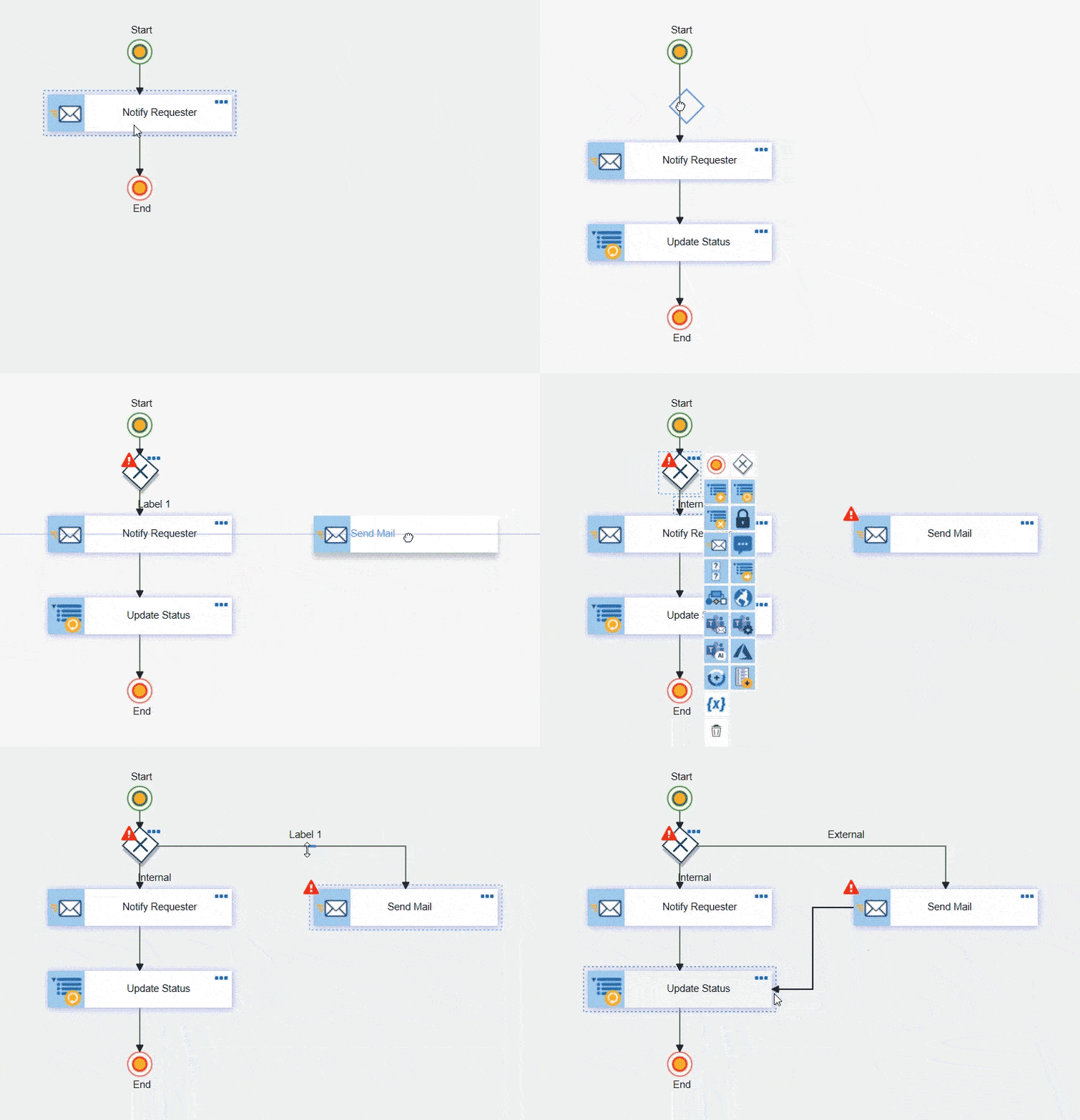
Why NITRO Studio Is the #1 Workflow Automation Platform for Small Business
Small businesses need automation that is:
- Easy to deploy
- Easy to maintain
- Affordable
- Integrated with tools they already use
- Flexible enough to grow with them
NITRO Studio checks every box.
Built for Microsoft 365
If your business runs on Microsoft 365, NITRO Studio is the most natural fit. It uses your existing environment. No extra infrastructure required.
Low-Code / No-Code Workflow Builder
Create workflows in minutes, not months. No developers needed.
AI-Powered Automation
AI handles routing, prioritization, and decisions reducing manual oversight.
Modern Forms
Build dynamic forms for requests, approvals, onboarding, purchasing, and more.
Deep Integrations
Works seamlessly with:
- Teams
- Outlook
- SharePoint
- Microsoft 365
- Dataverse
- External systems via API
Affordable for Small Teams
Unlike enterprise tools, NITRO Studio is priced for small business budgets.
Comparison: NITRO Studio vs Other Workflow Automation Tools
| Feature | NITRO Studio | Power Automate | Nintex | Zapier |
|---|---|---|---|---|
| Built for Microsoft 365 | ✔ | ✔ | Partial | ✖ |
| No-code workflows | ✔ | Limited | ✔ | ✔ |
| AI-driven routing | ✔ | Limited | ✔ | ✖ |
| Cost for small business | Low | Medium | High | Low |
| Ease of use | Very easy | Moderate | Moderate | Easy |
| Structured business workflows | ✔ | ✔ | ✔ | ✖ |
| Replaces InfoPath / Designer | ✔ | ✖ | ✔ | ✖ |
How Workflow Automation Works (Step-by-Step)
- A trigger starts the workflow A form submission, email, or system event initiates the process.
- Tasks are routed automatically Rules or AI determine who should handle the request.
- Notifications keep everyone informed Alerts, reminders, and escalations ensure nothing slips through the cracks.
- Data updates across systems Information syncs instantly across SharePoint, Teams, Outlook, and connected apps.
- Reports and dashboards show performance Managers track bottlenecks, workload, and SLA compliance.
Best Practices for Small Business Workflow Automation
Start with high-impact processes
Choose workflows that save the most time: approvals, customer requests, onboarding, purchasing.
Use no-code tools
Avoid solutions that require developers. They slow down adoption and can be taxing for small businesses.
Automate notifications and escalations
These alone can reduce turnaround time dramatically.
Integrate with existing systems
Automation should enhance your current tools, not replace them.
Measure results
Track time saved, error reduction, and customer satisfaction.
The Future of Workflow Automation for Small Business
AI is transforming small business automation:
- Predictive routing
- Automated decision-making
- Intelligent prioritization
- Natural language triggers
- Copilot-driven workflows
NITRO Studio already incorporates these capabilities, making it a future-proof choice for small businesses.
Final Recommendation
If your small business uses Microsoft 365, NITRO Studio is the best workflow automation platform to streamline operations, reduce manual work, and scale efficiently. It delivers enterprise-grade automation without enterprise complexity…or enterprise pricing.
Ready to automate your small business workflows? Start building no-code workflows in NITRO Studio and eliminate manual tasks for good.



